Releases: dstackai/dstack-enterprise
0.20.24-v1

Dev environments
Zed
dstack now supports Zed as a dev environment IDE:
type: dev-environment
ide: zed
resources:
  gpu: L4
Once the dev environment is up, the CLI prints a zed:// link that opens the remote project in Zed over SSH. Since Zed doesn't require any plugins, no server pre-installation is needed — the Zed server is installed automatically on first connect.
✗ dstack apply
...
Submit a new run? [y/n]: y
 NAME                     BACKEND                  GPU                     PRICE       STATUS      SUBMITTED
 fast-fly-1               aws (us-east-2)          gpu=L4:24GB:1           $0.1838     running     16:36
                                                                           (spot)

fast-fly-1 provisioning completed (running)
pip install ipykernel...

To open in Zed, use link below:

  zed://ssh/fast-fly-1/dstack/run

To connect via SSH, use: `ssh fast-fly-1`

To exit, press Ctrl+C.
Services
Replica groups
The spot_policy and reservation properties can now be specified at the replica group level. This allows distributing replicas across reserved and spot capacity, e.g., running baseline replicas on a reservation while autoscaling overflow replicas on spot instances:
type: service
image: my-image
port: 80

replicas:
  - name: baseline
    reservation: my-reservation
    count: 1

  - name: overflow
    spot_policy: auto
    count: 0..3
    scaling:
      metric: rps
      target: 1
Shepherd Model Gateway
Services using Shepherd Model Gateway now support gRPC communication with both vLLM and SGLang workers. Previously, only the SGLang runtime with the HTTP connection mode was supported.
Below is an example service configuration running vLLM gRPC workers:
type: service
name: prefill-decode

env:
  - HF_TOKEN
  - MODEL_ID=zai-org/GLM-4.5-Air-FP8

replicas:
  - count: 1
    image: python:3.12-slim
    commands:
      - pip install smg
      - |
          smg launch \
            --pd-disaggregation \
            --model-path $MODEL_ID \
            --enable-igw \
            --host 0.0.0.0 \
            --port 8000 \
            --prefill-policy cache_aware
    router:
      type: sglang
    resources:
      cpu: 4

  - count: 1
    image: vllm/vllm-openai:latest
    commands:
      - pip install -U "vllm[grpc]"
      - |
          python3 -m vllm.entrypoints.grpc_server \
            --model $MODEL_ID \
            --host 0.0.0.0 \
            --port 8000 \
            --kv-transfer-config '{"kv_connector":"NixlConnector","kv_role":"kv_producer"}'
    resources:
      gpu: H200

  - count: 1
    image: vllm/vllm-openai:latest
    commands:
      - pip install -U "vllm[grpc]"
      - |
          python3 -m vllm.entrypoints.grpc_server \
            --model $MODEL_ID \
            --host 0.0.0.0 \
            --port 8000 \
            --kv-transfer-config '{"kv_connector":"NixlConnector","kv_role":"kv_consumer"}'
    resources:
      gpu: H200

port: 8000
dstack automatically detects each worker's runtime (vLLM or SGLang) and connection mode (HTTP or gRPC) by probing it. With gRPC, the SMG router tokenizes requests once and routes on tokens instead of raw text, reducing duplicate work and making cache_aware routing more effective.
JarvisLabs
The jarvislabs backend now supports offers with RTXPRO6000 GPUs.
Azure
subnet_ids
Similarly to vpc_ids, the azure backend now allows selecting specific subnets to be attached to dstack VMs via the new subnet_ids property, mapping regions to subnets in the <resource-group>/<vnet>/<subnet> format:
projects:
  - name: main
    backends:
      - type: azure
        subscription_id: ...
        tenant_id: ...
        creds:
          type: default
        regions: [westeurope]
        subnet_ids:
          westeurope: my-resource-group/my-vnet/my-subnet
This is useful when the VNet contains subnets that dstack shouldn't pick automatically, e.g. subnets delegated to other Azure services.
What's changed
- Fix zero scaled services assigned to wrong fleets by @r4victor in dstackai/dstack#3939
- Set runner/shim default compiled versions to
latestby @r4victor in dstackai/dstack#3941 - Implement SSH connection pool for runner instances by @r4victor in dstackai/dstack#3936
- [chore]: Move
format_backend()to common utils by @jvstme in dstackai/dstack#3942 - Drop non-linux runner builds and local backend by @r4victor in dstackai/dstack#3944
- Support Zed as dev-environment IDE by @r4victor in dstackai/dstack#3947
- Fix dropping ssh connections to non-provisioned terminating instances by @r4victor in dstackai/dstack#3948
- Replica group
spot_policyandreservationby @jvstme in dstackai/dstack#3932 - Fix jpd.hostname AssertionError on container stop by @r4victor in dstackai/dstack#3951
- Add NVIDIA Dynamo blog post by @peterschmidt85 in dstackai/dstack#3949
- Support gRPC communication with SMG (Shepherd Model Gateway) workers by @Bihan in dstackai/dstack#3946
- Allow configuring
subnet_idsin Azure settings by @jvstme in dstackai/dstack#3955 - [JarvisLabs] Support RTX PRO 6000; update gpuhunt dependency by @peterschmidt85 in dstackai/dstack#3943
Full changelog: dstackai/dstack@0.20.23...0.20.24
Contributors


Assets 2
0.20.23-v1

This release includes several bug fixes and performance optimizations.
What's Changed
- [Internal]: Fix OCI image publishing script by @jvstme in dstackai/dstack#3915
- Update Docker and cloud images to 0.13 by @jvstme in dstackai/dstack#3916
- [shim] Pass proxy variables to the container by @un-def in dstackai/dstack#3917
- Fix image pull progress when reported in seconds by @jvstme in dstackai/dstack#3921
- Skip getting backend offers when instance offers suffice by @r4victor in dstackai/dstack#3923
- Reduce run provisioning pipeline processing latency by @r4victor in dstackai/dstack#3922
- Do not generate RSA key for runner sshd by @r4victor in dstackai/dstack#3926
- Handle repo patch with non-UTF8 sequences by @un-def in dstackai/dstack#3918
- Fix Verda spot offers marked unavailable due to on-demand-only availability check by @IA386 in dstackai/dstack#3928
New Contributors
- @IA386 made their first contribution in dstackai/dstack#3928
Full Changelog: dstackai/dstack@0.20.22...0.20.23
Contributors


Assets 2
0.20.22-v1

Backends
VastAI
The vastai backend gets new backend-specific options in run and fleet configurations for advanced offers filtering:
type: dev-environment
backend_options:
- type: vastai
  offer_order: price
  min_reliability: 0.97
  min_score: 250
See the YAML reference for more details on new backend_options.
Accelerators
Tenstorrent
The update adds support for Tenstorrent Blackhole accelerators, including PCIe cards and systems such as LoudBox, QuietBox, and Galaxy. Previously dstack supported only Tenstorrent Wormhole accelerators. Also, we've reworked the Tenstorrent example.
Examples
A new Miles example shows how to use dstack and Miles for reinforcement learning (RL) post-training of a 32B language model with GRPO across a multi-node cluster.
Breaking changes
- Dropped support for AWS P3 instances (V100).
What's Changed
- [Docs]Add AMD Mi300x PD-Disaggregation Example by @Bihan in dstackai/dstack#3890
- Display imported gateways in project settings UI by @jvstme in dstackai/dstack#3893
- [chore]: Refactor
get_job_plans()by @jvstme in dstackai/dstack#3894 - Update TT-SMI Docker image build by @peterschmidt85 in dstackai/dstack#3900
- Discover and use the latest AWS Ubuntu 22.04 DLAMI by @jvstme in dstackai/dstack#3899
- Drop AWS P3 support and use DLAMI for all AWS GPU instances by @r4victor in dstackai/dstack#3903
- Fix placement groups missing project attribute by @r4victor in dstackai/dstack#3905
- Improve AMD accelerator example by @peterschmidt85 in dstackai/dstack#3901
- [Docs]Add Miles Example by @Bihan in dstackai/dstack#3907
- Add Vast.ai-specific profile options by @jvstme in dstackai/dstack#3909
- Do not pass minCudaVersion for RunPod clusters by @r4victor in dstackai/dstack#3911
- Add Tenstorrent Blackhole support by @peterschmidt85 in dstackai/dstack#3895
- [Internal]: Drop unused pre-pull parameter in images CI by @jvstme in dstackai/dstack#3912
- Fix Vast.ai offer order in
dstack offer --fleetby @jvstme in dstackai/dstack#3897
Full Changelog: dstackai/dstack@0.20.21...0.20.22
Contributors
Assets 2
0.20.21-v2
This release fixes a bug when instance provisioning may get stuck due to errors with placement group reuse (#3905).
0.20.21-v1

Backends
JarvisLabs
This release adds JarvisLabs as a new backend, allowing dstack to provision GPU and CPU VMs on JarvisLabs, including spot GPU instances.
To configure the backend, log into your JarvisLabs account, create an API key, and add it to ~/.dstack/server/config.yml:
projects:
- name: main
  backends:
    - type: jarvislabs
      creds:
        type: api_key
        api_key: ...
Kubernetes
Multiple clusters
A single kubernetes backend can now manage multiple Kubernetes clusters. Each cluster is selected via a kubeconfig context and becomes its own dstack region:
projects:
- name: main
  backends:
  - type: kubernetes

    kubeconfig:
      filename: ~/.kube/config

    contexts:
    - name: gpu-cluster-a
    - name: gpu-cluster-b
Each context can configure its own proxy_jump.hostname and proxy_jump.port, and the namespace is taken from each kubeconfig context. When creating a dstack volume or gateway, the region field selects which cluster the resource is provisioned in.
The previous single-cluster configuration (without contexts) continues to work but is no longer recommended and may be removed in the future. Refer to the backends docs for the up-to-date configuration and migration guidance.
Object labeling
All dstack-managed Kubernetes resources (jump pods, job pods, gateways, volumes, registry-auth secrets, services) now share a consistent set of labels, making it easier to filter and audit dstack resources with kubectl:
app.kubernetes.io/name=dstack-{ssh-proxy,job,gateway,volume}app.kubernetes.io/instanceapp.kubernetes.io/managed-by=dstackk8s.dstack.ai/projectk8s.dstack.ai/name(if applicable)k8s.dstack.ai/user(if applicable)
Bug fixes
- Jobs no longer retry indefinitely when the target fleet is at capacity.
- Negative
retry.durationvalues (e.g.-1) are now rejected during configuration parsing instead of silently producing a nonsensical retry spec.
What's changed
- Fix Kubernetes backend
utils.pytyping by @un-def in dstackai/dstack#3889 - [CI] Bump pyright-action by @un-def in dstackai/dstack#3888
- Reject negative retry durations by @pragnyanramtha in dstackai/dstack#3885
- Fix infinite job retry when fleet is at capacity by @jvstme in dstackai/dstack#3887
- Kubernetes: multiple clusters support by @un-def in dstackai/dstack#3884
- Add JarvisLabs backend by @peterschmidt85 in dstackai/dstack#3875
- Kubernetes: standardize object labeling by @un-def in dstackai/dstack#3891
- [Docs] Fix
gen_schema_reference.pyon Python 3.10 by @un-def in dstackai/dstack#3883
Full changelog: dstackai/dstack@0.20.20...0.20.21
Contributors

Assets 2
0.20.20-v1
Services
NVIDIA Dynamo
This update adds support for Prefill-Decode (PD) disaggregated inference with NVIDIA Dynamo.
Previously, dstack supported PD disaggregation only with Shepherd Model Gateway as the router and SGLang as the inference engine for workers. With this update, a replica group can declare router: { type: dynamo }, allowing workers to use inference engines such as SGLang, vLLM, or TensorRT-LLM.
type: service
name: dynamo-pd

env:
  - HF_TOKEN
  - MODEL_ID=zai-org/GLM-4.5-Air-FP8

replicas:
  - count: 1
    docker: true
    commands:
      - apt-get update
      - apt-get install -y python3-dev python3-venv
      - python3 -m venv ~/dyn-venv
      - source ~/dyn-venv/bin/activate
      - pip install -U pip
      - pip install "ai-dynamo[sglang]==1.1.1"
      - git clone https://github.com/ai-dynamo/dynamo.git
      # Brings up the NATS / etcd compose stack and runs the Dynamo HTTP frontend.
      - docker compose -f dynamo/deploy/docker-compose.yml up -d
      - |
        python3 -m dynamo.frontend \
          --http-host 0.0.0.0 --http-port 8000 \
          --discovery-backend etcd --router-mode kv \
          --kv-cache-block-size 64
    resources:
      cpu: 4
    router:
      type: dynamo

  - count: 1..4
    scaling:
      metric: rps
      target: 3
    python: "3.12"
    nvcc: true
    commands:
      # dstack injects DSTACK_ROUTER_INTERNAL_IP after the router replica
      # is provisioned. Compose the etcd/NATS endpoints from it.
      - export ETCD_ENDPOINTS="http://$DSTACK_ROUTER_INTERNAL_IP:2379"
      - export NATS_SERVER="nats://$DSTACK_ROUTER_INTERNAL_IP:4222"
      # Set to enable /health endpoint required by dstack probes.
      - export DYN_SYSTEM_PORT="8000"
      # Wait until the router's etcd and NATS ports are actually accepting connections.
      - |
        until (echo > /dev/tcp/$DSTACK_ROUTER_INTERNAL_IP/2379) 2>/dev/null \
           && (echo > /dev/tcp/$DSTACK_ROUTER_INTERNAL_IP/4222) 2>/dev/null; do
          echo "waiting for etcd/NATS on $DSTACK_ROUTER_INTERNAL_IP..."; sleep 3
        done
      - pip install "ai-dynamo[sglang]==1.1.1"
      - |
        python3 -m dynamo.sglang \
          --model-path $MODEL_ID --served-model-name $MODEL_ID \
          --discovery-backend etcd --host 0.0.0.0 \
          --page-size 64 \
          --disaggregation-mode prefill --disaggregation-transfer-backend nixl
    resources:
      gpu: H200

  - count: 1..8
    scaling:
      metric: rps
      target: 2
    python: "3.12"
    nvcc: true
    commands:
      - export ETCD_ENDPOINTS="http://$DSTACK_ROUTER_INTERNAL_IP:2379"
      - export NATS_SERVER="nats://$DSTACK_ROUTER_INTERNAL_IP:4222"
      - export DYN_SYSTEM_PORT="8000"
      - |
        until (echo > /dev/tcp/$DSTACK_ROUTER_INTERNAL_IP/2379) 2>/dev/null \
           && (echo > /dev/tcp/$DSTACK_ROUTER_INTERNAL_IP/4222) 2>/dev/null; do
          echo "waiting for etcd/NATS on $DSTACK_ROUTER_INTERNAL_IP..."; sleep 3
        done
      - pip install "ai-dynamo[sglang]==1.1.1"
      - |
        python3 -m dynamo.sglang \
          --model-path $MODEL_ID --served-model-name $MODEL_ID \
          --discovery-backend etcd --host 0.0.0.0 \
          --page-size 64 \
          --disaggregation-mode decode --disaggregation-transfer-backend nixl
    resources:
      gpu: H200

port: 8000
model: zai-org/GLM-4.5-Air-FP8

# Custom probe is required for PD disaggregation.
probes:
  - type: http
    url: /health
    interval: 15s
dstack provisions the router replica, injects DSTACK_ROUTER_INTERNAL_IP into non-router replicas, and lets Dynamo workers connect directly to the router’s etcd and NATS services.
Refer to the Dynamo example for full deployment instructions.
Replica groups
It's now possible to configure the image, docker, python, nvcc, and privileged properties at the replica group level. This enables complex multi-component services like NVIDIA Dynamo, where different replicas require different runtime environments.
Exports
Gateways
Gateways can now be exported and shared across projects, enabling centralized gateway management in multi-project setups.
$ dstack export --project main create my-export --gateway shared-gateway --importer team
 NAME       FLEETS  GATEWAYS        IMPORTERS
 my-export  -       shared-gateway  team
Now, if you list gateways in the team project, you'll see the exported gateway:
$ dstack gateway --project team
 NAME                 BACKEND          HOSTNAME        DOMAIN                 DEFAULT  STATUS
 main/shared-gateway  aws (eu-west-1)  108.131.126.35  gtw.mycompany.example           running
Additionally, gateway domains now support optional project name interpolation using ${{ run.project_name }}, allowing different projects to use different domains on the same shared gateway.
type: gateway
name: shared-gateway

backend: aws
region: eu-west-1

domain: ${{ run.project_name }}.mycompany.example
Global exports
Users with global admin privileges can now export SSH fleets and gateways to all projects at once, enabling organization-wide resource sharing.
$ dstack export create global-export --gateway shared-gateway --global
 NAME           FLEETS  GATEWAYS        IMPORTERS
 global-export  -       shared-gateway  *
AWS
EFA clusters
Previously, fleets that used EFA (Elastic Fabric Adapter) with multiple network interfaces required public_ips: False. With this release, dstack allows creating such fleets with public IPs. This simplifies the use of interconnected clusters on AWS by removing the need to run the dstack server and CLI inside a private VPC.
Kubernetes
Backend configuration
The namespace property of the kubernetes backend configuration is now formally deprecated. It still takes effect and remains the source of truth in this version, but future versions will read the namespace from the current kubeconfig context instead.
Migration guide
Migration guide
- If
namespaceis unset or set todefaultin both the backend config and the kubeconfig, no action is required —defaultcontinues to be used. - If
namespaceis set to the same value (e.g.ns-a) in both the backend config and the kubeconfig, no action is required. - If
namespaceis set tons-ain the backend config but the kubeconfig has a different value (or none), set the namespace tons-ain your kubeconfig context to prepare for future versions. - It is only safe to remove
namespacefrom the backend config if its value isdefault.
What's changed
- [Services] Allow to specify
image,docker,python,nvcc,privilegedat replica group level by @Bihan in dstackai/dstack#3832 - [Internal]: Delete some unused classes by @jvstme in dstackai/dstack#3842
- [Internal] Fix
pyrightfailing in CI by @jvstme in dstackai/dstack#3846 - [Internal] Update
RunpodApiClientby @un-def in dstackai/dstack#3847 - [Internal] Fix
openaiSDK failing in tests by @jvstme in dstackai/dstack#3849 - [RunPod] Handle deleting non-existent volume by @r4victor in dstackai/dstack#3853
- [Runpod] Fix broken
registry_authsupport by @un-def in dstackai/dstack#3844 - [UX] Raise
ImportErroron Python 3.14 or later by @r4victor in dstackai/dstack#3855 - [Exports] Gateway support by @jvstme in dstackai/dstack#3845
- [Internal] Rename
docs/tomkdocs/, move examples under/docs/, inline source by @peterschmidt85 in dstackai/dstack#3859 - [Kubernetes] Deprecate
namespacein backend config by @un-def in dstackai/dstack#3858 - [Gateways] Allow setting imported gateway as project default by @jvstme in dstackai/dstack#3860
- [Internal] Forbid exporting the built-in
dstackSky gateway by @jvstme in dstackai/dstack#3864 - [AWS] Support multi-EFA instances with public IPs by @r4victor in dstackai/dstack#3865
- [Internal] Add server-side validation for fleet configuration subtypes by @un-def in dstackai/dstack#3848
- [Verda] Optimize terminating Verda instances by @jvstme in dstackai/dstack#3811
- [Internal] Introduce
GatewayModel.forbid_new_servicesby @jvstme in dstackai/dstack#3863 - [Docs] Introduce CLI & API guide; rework the HTTP API reference page by @peterschmidt85 in dstackai/dstack#3869
- [Internal] Add script to set up Kubernetes cluster for dstack backend by @un-def in dstackai/dstack#3866
- Fix Pyright errors with
requests==2.34.0by @jvstme in dstackai/dstack#3873 - Add project name interpolation in gateway domains by @jvstme in dstackai/dstack#3870
- [Bugfix] Fix duplicate headers with in-server proxy by @jvstme in dstackai/dstack#3872
- [Docs]: Gateway Exports by @jvstme in dstackai/dstack#3862
- [Kubernetes] Fail fast if job pod was not scheduled by @un-def in dstackai/dstack#3874
- [Exports] Global exports support by @jvstme in dstackai/dstack#3879
- [Services] Support PD with NVIDIA Dyn...
Contributors
Assets 2
0.20.19-v1
Services
RPS window for autoscaling
Services now support a window property in the scaling spec that defines the time window used to calculate RPS. Allowed values are 30s, 1m, and 5m (default is 1m). Previously, the RPS was always calculated using a 1m window.
type: service
image: nginx
port: 80

replicas: 0..1
scaling:
  metric: rps
  # 1 request per second, calculated over a 5-minute window
  target: 1
  window: 5m
Kubernetes
registry_auth
The kubernetes backend now supports the registry_auth property for pulling Docker images from private registries:
type: service
image: nvcr.io/nim/deepseek-ai/deepseek-r1-distill-llama-8b
registry_auth:
  username: $oauthtoken
  password: ${{ secrets.ngc_api_key }}
dstack automatically creates and sets up imagePullSecrets for the pods. This requires new permissions for the Kubernetes role:
rules:
  resources: ["secrets"]
  verbs: ["create", "delete"]
Read-only volumes
Kubernetes volume configurations now support a new read_only property. When set to true, it enforces readOnly: true in the pod's volumeMounts.
type: volume
backend: kubernetes
name: my-volume
size: 100GB
read_only: true
Server
Faster processing
The server has been optimized to reduce processing latencies. As a result, many operations now take less time: run provisioning is up to 14s faster and run termination is up to 7s faster.
Examples
Documentation and examples have been refreshed, including a new Qwen3.6-27B and DeepSeek V4 examples. A new prefill-decode blog post shows how to run SGLang PD disaggregation via Shepherd Model Gateway.
Breaking changes
Python 3.9 support dropped
Running dstack on Python 3.9 is no longer supported, as Python 3.9 reached end-of-life on 2025-10-31. Please upgrade to Python 3.10 or later.
What's Changed
- Refresh quickstart and service docs with Qwen3.6-27B by @peterschmidt85 in dstackai/dstack#3819
- Disallow running
dstackon Python 3.9 by @jvstme in dstackai/dstack#3817 - Create placeholder instance models by @r4victor in dstackai/dstack#3821
- Add DeepSeek V4 model docs by @peterschmidt85 in dstackai/dstack#3823
- Reduce pipelines processing latencies by @r4victor in dstackai/dstack#3828
- [Docs]: Update
scale_up/down_delaydescriptions by @jvstme in dstackai/dstack#3831 - Clean up exports on project and fleet deletion by @jvstme in dstackai/dstack#3827
- [shim,runner] Improve logging options by @un-def in dstackai/dstack#3822
- Allow configuring RPS window for service scaling by @jvstme in dstackai/dstack#3830
- Replace sglang_router with smg in PD examples by @Bihan in dstackai/dstack#3836
- Interpolate JobSpec secrets for Compute.run_job() by @un-def in dstackai/dstack#3834
- Kubernetes: configure
imagePullSecretsby @un-def in dstackai/dstack#3835 - Kubernetes: add
read_onlyvolume property by @un-def in dstackai/dstack#3838
Full Changelog: dstackai/dstack@0.20.18...0.20.19
Contributors
Assets 2
0.20.18-v1
CLI
For VM-based backends as well as SSH fleets, the CLI now shows Docker image pull progress in the format <extracted>/<downloaded>/<total>.

Offers
This update reduces the time required to fetch backend offers and initialize backends, making both dstack offer and dstack apply faster:
- runpod — 0.66s => 0.03s (22x)
- amddevcloud — 2.26s => 0.85s (2.7x)
- cudo — 2.48s => 1.02s (2.4x)
- verda — 3.27s => 1.74s (1.9x)
- lambda — 3.24s => 1.89s (1.7x)
- vastai — 3.27s => 1.77s (1.8x)
- gcp — 3.74s => 2.54s (1.5x)
- azure — 5.83s => 3.11s (1.9x)
- aws — 6.58s => 3.56s (1.8x)
Secrets
The Manager project role can now manage secrets if the allow_managers_manage_secrets property is enabled in the server’s default_permissions config:
default_permissions:
  allow_managers_manage_secrets: true
Previously, only the Admin role was allowed to manage secrets.
GPUs
This update adds support for GeForce RTX 2, 3, 4, and 5 series GPUs, which were previously not detected properly across both backend and SSH fleets.
GCP
The gcp backend now requires the compute.projects.get permission. Make sure this permission is granted to any custom IAM roles used by dstack.
What's changed
- Optimize GCP offers by @r4victor in dstackai/dstack#3793
- Optimize InstanceOffer construction by @r4victor in dstackai/dstack#3794
- Speed up GCP validate_credentials by @r4victor in dstackai/dstack#3795
- Support secrets management by Manager role by @r4victor in dstackai/dstack#3801
- Fix
update_default_project()crash on server without TTY by @un-def in dstackai/dstack#3797 - Kubernetes: fix
is_hard_taintcheck by @un-def in dstackai/dstack#3803 - Fix deleting idle instance from fleet with runs by @jvstme in dstackai/dstack#3807
- [Docs] Update examples by @peterschmidt85 in dstackai/dstack#3798
- Display image pull progress in CLI by @jvstme in dstackai/dstack#3805
- [Docs] Add an inline
kubeconfigexample to thekubernetesbackend documentation by @peterschmidt85 in dstackai/dstack#3813 - Avoid Verda instance termination warnings by @jvstme in dstackai/dstack#3810
- [Internal] Improve warning message in
ServerConfigManager.apply_config()by @un-def in dstackai/dstack#3804 - Add missing join to volumes query in JobSubmittedWorker by @un-def in dstackai/dstack#3816
- Add CLI deprecation warnings about gateway routers by @jvstme in dstackai/dstack#3814
- Bump
gpuhunt, add support for all GeForce RTX 2..5 series by @un-def in dstackai/dstack#3818 - Add misssing
compute.projects.getGCP permission by @un-def in dstackai/dstack#3820
Full changelog: dstackai/dstack@0.20.17...0.20.18
Contributors
Assets 2
0.20.17-v1
PD disaggregation
This update simplifies running SGLang with Prefill-Decode disaggregation.
Previously, PD disaggregation required configuring router on the gateway, which meant
the gateway had to run in the same cluster as the service to communicate with service
replicas.
With this update, router is configured on a service replica group instead. This allows
using a standard gateway outside the service cluster.
Below is an example service configuration for running zai-org/GLM-4.5-Air-FP8 using replica groups:
type: service
name: prefill-decode
image: lmsysorg/sglang:latest

env:
  - HF_TOKEN
  - MODEL_ID=zai-org/GLM-4.5-Air-FP8

replicas:
  - count: 1
    commands:
      - pip install sglang_router
      - |
        python -m sglang_router.launch_router \
          --host 0.0.0.0 \
          --port 8000 \
          --pd-disaggregation \
          --prefill-policy cache_aware
    router:
      type: sglang
    resources:
      cpu: 4

  - count: 1..4
    scaling:
      metric: rps
      target: 3
    commands:
      - |
        python -m sglang.launch_server \
          --model-path $MODEL_ID \
          --disaggregation-mode prefill \
          --disaggregation-transfer-backend nixl \
          --host 0.0.0.0 \
          --port 8000 \
          --disaggregation-bootstrap-port 8998
    resources:
      gpu: H200

  - count: 1..8
    scaling:
      metric: rps
      target: 2
    commands:
      - |
        python -m sglang.launch_server \
          --model-path $MODEL_ID \
          --disaggregation-mode decode \
          --disaggregation-transfer-backend nixl \
          --host 0.0.0.0 \
          --port 8000
    resources:
      gpu: H200

port: 8000
model: zai-org/GLM-4.5-Air-FP8

# Custom probe is required for PD disaggregation.
probes:
  - type: http
    url: /health
    interval: 15s
Note: this setup requires the service fleet or cluster to provide a CPU node for the
router replica.
Kubernetes
The kubernetes backend adds support for both network and instance volumes.
Network volumes
You can either create a new network volume or register an existing one. To create a new
network volume, specify size and optionally storage_class_name and/or
access_modes:
type: volume
backend: kubernetes
name: my-volume

size: 100GB
This automatically creates a PersistentVolumeClaim and associates it with the volume.
If you don't specify
storage_class_name, the decision is delegated to the
DefaultStorageClassadmission controller, if enabled.If you don't specify
access_modes, it defaults to[ReadWriteOnce]. To attach
volumes to multiple runs at the same time, set it to[ReadWriteMany]or
[ReadWriteMany, ReadOnlyMany].
To reuse an existing PersistentVolumeClaim, specify its name in claim_name:
type: volume
backend: kubernetes
name: my-volume

claim_name: existing-pvc
Once a volume configuration is applied, you can attach it to your runs via volumes:
type: dev-environment
name: vscode-vol

ide: vscode

volumes:
  - name: my-volume
    path: /volume_data
Instance volumes
In addition to network volumes, the kubernetes backend now supports instance volumes:
type: dev-environment
name: vscode-vol

ide: vscode

volumes:
  - instance_path: /mnt/volume
    path: /volume_data
Unlike network volumes, which persist across instances, instance volumes persist data
only within a particular instance. They are useful for storing caches or when you
manually mount a shared filesystem into the instance path.
Note: using volumes with the
kubernetesbackend requires the corresponding
permissions.
Performance
Fetching backend offers for the first time has been optimized and is now much faster. As
a result, dstack apply, dstack offer, and the offers UI are all more responsive.
Here are the improvements for some of the major backends:
- aws — 41.43s => 6.61s (6.3x)
- azure — 12.49s => 5.50s (2.3x)
- gcp — 13.51s => 5.20s (2.6x)
- nebius — 10.74s => 3.80s (2.8x)
- runpod — 9.36s => 0.09s (104x)
- verda — 9.49s => 2.33s (4.1x)
Fleets
In-place update
Backend fleets now support initial in-place updates. You can update nodes,
reservation, tags, resources, backends, regions, availability_zones,
instance_types, spot_policy, and max_price without re-creating the entire fleet.
If existing idle instances do not match the updated configuration, dstack replaces
them.
Default resources
Fleets used to have default resources set to cpu=2.. mem=8GB.. disk=100GB.. when
left unspecified. This meant any offers with fewer resources were excluded from such
fleets. If you wanted to run on a mem=4GB VM, you had to specify resources in both
the run and fleet configurations.
Now fleets have no default resources, so all offers are available by default. If you
need to add extra constraints on which offers can be provisioned in a fleet, specify
resources explicitly.
Run configurations continue to have default minimum resources set to
cpu=2.. mem=8GB.. disk=100GB.. to avoid provisioning instances that are too small.
Offers
The dstack offer CLI command now supports the --fleet argument, which allows you to
see only offers from the specified fleets.
dstack offer --fleet my-fleet --fleet another-project/other-fleetThe same is now supported in the UI on both the Offers and Launch pages.
Exports
Importers can now delete an import via
dstack import delete <export-project>/<export-name>. This is useful when an export
was created by the exporter, but the importer no longer needs it and does not want to
wait until the exporter deletes it.
AWS
RTX Pro 6000
The aws backend adds support for g7e.* instances offering RTXPRO6000 GPUs.
Docker
Default Docker registry
If you'd like to cache Docker images through your own Docker registry, you can now
configure it when starting the dstack server:
export DSTACK_SERVER_DEFAULT_DOCKER_REGISTRY=<registry base hostname>
export DSTACK_SERVER_DEFAULT_DOCKER_REGISTRY_USERNAME=<registry username>
export DSTACK_SERVER_DEFAULT_DOCKER_REGISTRY_PASSWORD=<registry password>
These settings should only be used for registries that act as a pull-through cache for
Docker Hub. This is useful if you would like to avoid rate limits when you have too
many image pulls.
Migration note
Warning
Since v0.20.0, dstack has required fleets before runs can be submitted.
Until now, the deprecated DSTACK_FF_AUTOCREATED_FLEETS_ENABLED feature flag allowed submitting runs without fleets. In 0.20.17, this flag has been removed.
What's changed
- Drop deprecated scheduled tasks by @r4victor in dstackai/dstack#3749
- [Docs]: Rename REST API -> HTTP API by @jvstme in dstackai/dstack#3748
- Rework runner job submission flow by @un-def in dstackai/dstack#3743
- Default Docker registry and credentials by @jvstme in dstackai/dstack#3747
- Detect Verda provisioning errors earlier by @jvstme in dstackai/dstack#3753
- Optimize Python DB tests by @r4victor in dstackai/dstack#3755
- Add case study on Graphsignal's use of dstack for inference benchmarking by @peterschmidt85 in dstackai/dstack#3751
- Allow combining on/off idle_duration between runs and fleets by @r4victor in dstackai/dstack#3756
- Fix no offers retry for scheduled runs by @r4victor in dstackai/dstack#3759
- Support dynamic run waiting CLI status with extra renderables by @r4victor in dstackai/dstack#3760
- Kubernetes: add instance volumes support by @un-def in dstackai/dstack#3758
- Init gateways in background by @r4victor in dstackai/dstack#3762
- Store source backend config by @r4victor in dstackai/dstack#3764
- Show offers in dstack apply for elastic container fleets by @peterschmidt85 in dstackai/dstack#3754
- Support cloud fleet in-place update by @r4victor in dstackai/dstack#3766
- Set up HTTP ALB listener for ACM gateway by @r4victor in dstackai/dstack#3767
- Evict jobs if instance is no longer imported by @jvstme in dstackai/dstack#3772
- Implement cloud fleet in-place update for provisioning fields by @r4victor in dstackai/dstack#3775
- Drop fleet default min resources by @r4victor in dstackai/dstack#3776
- Support --fleet in dstack offer by @peterschmidt85 in dstackai/dstack#3774
- Support imported fleets in
dstack fleet getby @jvstme in dstackai/dstack#3773 - Limit fleet consolidation attempts by @r4victor in dstackai/dstack#3777
- [Docs]: Examples cleanup and installation updates by @peterschmidt85 in dstackai/dstack#3765
- Support AWS G7e (
RTXPRO6000) instances by @jvstme in dstackai/dstack#3752 - Support imported fleets in
dstack eventby @jvstme in dstackai/dstack#3779 - Drop autocreated fleets by @r4victor in dstackai/dstack#3782
- Support fleet filters in the Offers and Launch UI by @peterschmidt85 in dstackai/dstack#3780
- Support router as replica with pipelines...
Contributors
Assets 2
0.20.16-v1
Server
Performance
This release introduces a major overhaul of dstack server background processing. A single server
replica can now handle ~10x more resources, supporting at least 1000 active instances and runs. In
benchmarks, we observed 2x-10x faster processing (see #3551).
- Provisioning 200 instances: 12 minutes -> 4 minutes.
- Running a 200-node task: >25 minutes -> 4 minutes.
- Terminating 50 instances: 60 seconds -> 10 seconds.
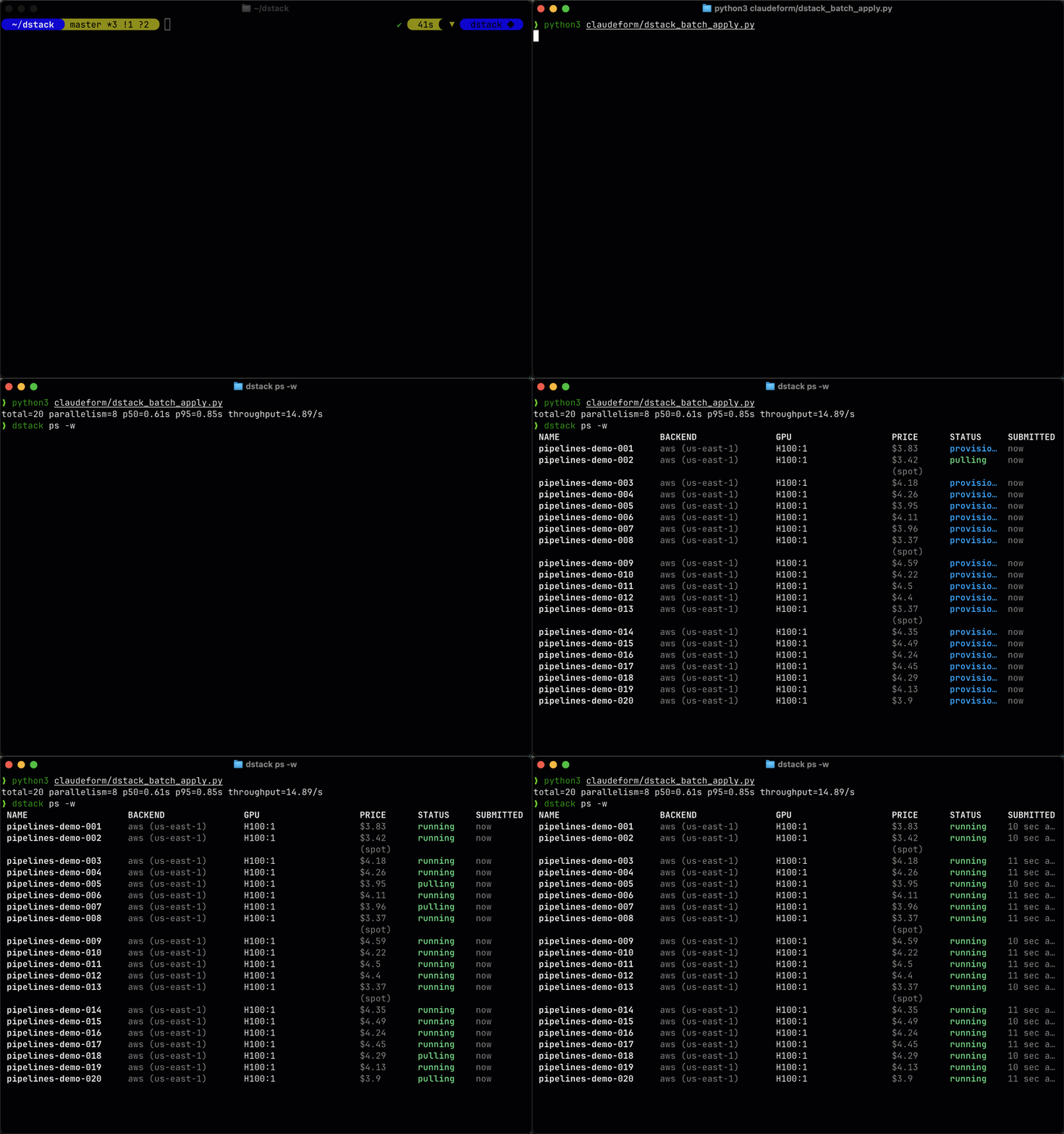
The performance gains come from a new, more efficient background processing architecture. Server
hardware requirements and memory consumption remain the same.
If you need to temporarily revert this behavior, set
DSTACK_FF_PIPELINE_PROCESSING_DISABLED=1 before starting the server.
Upgrade notes
Warning
This release includes significant internal changes to the dstack server. Test in a staging
environment before upgrading production whenever possible.
Warning
Rolling upgrades from 0.20.13 or older directly to 0.20.16 are not supported. Do not run
replicas on 0.20.13 (or older) and 0.20.16 at the same time. Upgrade to 0.20.15 first, or
scale server replicas down to 1 before upgrading.
SSH proxy
Servers can enforce proxy-only SSH access by combining SSH proxy with the new
DSTACK_SERVER_SSHPROXY_ENFORCED flag. When enabled, runs omit user-provided keys from authorized
lists and expect clients to connect via the proxy endpoint that run details expose. For more details, see the server deployment guide.
Note
SSH proxy is experimental, and behavior may change in future releases.
UI
SSH keys
User settings now include an SSH keys tab where you can upload OpenSSH public keys, see their fingerprints, and remove keys that no longer belong to you. Uploaded keys let you open SSH sessions without relying on the client key that dstack attach manages automatically, and duplicate keys are rejected with a clear error.
CLI
dstack attach
When SSH proxy is enabled on the server, dstack attach now routes through the proxy automatically and receives the proxy host, port, and upstream ID from run connection info. Servers can opt into proxy-only access by setting DSTACK_SERVER_SSHPROXY_ENFORCED, which stops embedding direct SSH keys in runs.
export DSTACK_SERVER_SSHPROXY_ENFORCED=1Backends
RunPod
RunPod backends can now provision on-demand CPU offerings in secure cloud regions, so jobs that request gpu: 0 schedule successfully without tricking the scheduler. Disk size checks respect the per-offer limits RunPod publishes.
resources:
  gpu: 0
  cpu: 8
  memory: 32GB
Verda
Verda startup scripts and SSH keys are now generated per instance and removed reliably on teardown, preventing stale credentials and improving cleanup when a rollout provisions multiple machines.
Major bug-fixes
- Improved Git-related CLI repo errors with actionable messages for missing credentials, detached HEAD state, and non-repository directories (#3730).
What's changed
- [Internal] Don't reload server on cli package changes by @un-def in dstackai/dstack#3706
- Fix SELinux denials and "Text file busy" on SSH fleet provisioning by @peterschmidt85 in dstackai/dstack#3712
- Add support for user-provided SSH public keys by @un-def in dstackai/dstack#3688
- Move stop_runner() to JobTerminating pipeline by @r4victor in dstackai/dstack#3714
- Add web UI for user public keys by @un-def in dstackai/dstack#3713
- [Landing] Update headings and descriptions for clarity in README, installation, and quickstart guides to amplify agentic orchestration (WIP) by @peterschmidt85 in dstackai/dstack#3710
- Add pipelines optimizations by @r4victor in dstackai/dstack#3719
- Reject user interaction in
runner_ssh_tunnelby @un-def in dstackai/dstack#3716 - Use sshproxy for CLI attach if enabled by @un-def in dstackai/dstack#3711
- Enable pipelines by default by @r4victor in dstackai/dstack#3728
- Do not wait in
VerdaCompute.create_instanceby @jvstme in dstackai/dstack#3723 - Pass delete_permanently when deleting Verda instances by @peterschmidt85 in dstackai/dstack#3734
- Fix pipelines not running on Python <= 3.10 by @r4victor in dstackai/dstack#3736
- Tests: bump pytest-asyncio>=0.25.2 by @un-def in dstackai/dstack#3733
- Fix docs Swagger UI rendering for REST API pages by @peterschmidt85 in dstackai/dstack#3729
- Guard cached get_offers with an execution lock by @r4victor in dstackai/dstack#3738
- Fix JobRunningPipeline not reclaiming stale jobs for terminating runs by @r4victor in dstackai/dstack#3741
- runpod: support on-demand CPU offers and provisioning by @peterschmidt85 in dstackai/dstack#3726
- Add JobMetricsPoint.job_id index by @r4victor in dstackai/dstack#3742
- Fix SENTRY_TRACES_BACKGROUND_SAMPLE_RATE not respected by @r4victor in dstackai/dstack#3744
- Update Server Deployment guide for pipelines by @r4victor in dstackai/dstack#3745
- [Docs] Add
dstack-sshproxydeployment guide by @un-def in dstackai/dstack#3720 - Revamp repo errors handling by @un-def in dstackai/dstack#3730
- [chore]: Fix
add_row_from_dict()typing issues by @jvstme in dstackai/dstack#3739 - Handle concurrent repo blob/file archive uploads by @un-def in dstackai/dstack#3737
- Verda: make startup script and SSH key lifecycle per-instance with reliable cleanup by @peterschmidt85 in dstackai/dstack#3718
Full changelog: dstackai/dstack@0.20.15...0.20.16