CLI that computes per-author GitHub language statistics by inspecting the files changed in every commit authored by a given user.
Unlike GET /repos/{owner}/{repo}/languages (which returns repo-wide bytes regardless of who wrote them), this tool only counts lines in files you personally changed.
GitHub's default profile has two major limitations:
GitHub shows your total contributions but doesn't break them down by programming language. This tool gives you accurate, per-language statistics based on your actual code changes.
Your GitHub profile only displays contributions to public repositories. For developers working primarily on private codebases (common in professional settings), this misrepresents your actual activity.
This tool solves both problems:
- ✅ Accurate language breakdown — See exactly how many lines you've changed in TypeScript, Python, Go, etc.
- ✅ Safe private repo representation — Generate aggregate statistics from private repositories without exposing sensitive code or repository names (you control what gets shared in the output)
- ✅ Verifiable with your own GitHub token — Anyone can validate the data by running the tool themselves with their own credentials
Perfect for portfolios, resumes, and demonstrating your real technical expertise.
| Phase | API | Cost | Rate Limit |
|---|---|---|---|
| 1. Discover repos | GraphQL contributionsCollection |
~20 calls (one per year) | 5,000/hr |
| 2. Collect commit SHAs per repo | GraphQL history(author: ...) |
~1 call per 100 commits | 5,000/hr |
| 3. Fetch per-commit file details | REST GET /repos/:owner/:repo/commits/:sha |
1 call per commit | 5,000/hr |
| 4. Collect PR counts (optional) | REST Search API GET /search/issues |
1 call per repo | 30/min |
Progress is cached in .github-lang-stats-cache/<user>.json so interrupted runs resume from where they left off.
⚠️ Former employer / removed from org? Phase 3 requires current read access to each repository. If you've since been removed from a private org or repo, thoseGET /commits/:shacalls will return404and no language stats will be collected for that work.Workaround: Run the tool while you still have access and keep the cache file. On future runs the tool will use cached data, so your stats remain intact even after access is revoked.
Note: PR counts are collected by default starting with Phase 4. Use --exclude-pr-counts to skip this phase if you don't need PR data. The Search API has a stricter rate limit (30 requests/minute), so PR collection includes automatic 2-second delays between requests.
For each file in each commit we count additions + deletions. This is a proxy for "language activity" — it's not as precise as bytes stored, but it correctly reflects only work you did.
npx github-lang-stats --token=<pat> --output=stats.json
# or explicitly:
npx github-lang-stats --user=<github-username> --token=<pat> --output=stats.jsonnpm i -g github-lang-stats
gls --token=<pat>
# or with explicit username:
gls --user=<github-username> --token=<pat>npm i github-lang-statsimport { getGithubLangStats, type ProgressEvent } from "github-lang-stats";
const stats = await getGithubLangStats({
// user is optional — resolved automatically from the token if omitted
token: process.env.GITHUB_TOKEN,
// all fields below are optional
fromYear: 2020, // defaults to 10 years ago
excludeLanguages: ["JSON", "YAML"], // omit languages from totals
concurrency: 5, // concurrent REST requests (default: 5)
cachePath: "./.my-cache/octocat.json", // override default cache location
useCache: true, // set false to disable caching
repos: ["octocat/Hello-World"], // restrict to specific repos; omit for all
includeCommitDates: true, // include commit dates for heatmaps (default: true)
includePRCounts: true, // include PR counts for activity metrics (default: true)
onProgress: (e: ProgressEvent) => {
if (e.phase === "discover") console.log(e.details);
if (e.phase === "shas") console.log(`${e.repo}: ${e.count} commits`);
if (e.phase === "details") console.log(`${e.fetched}/${e.total} commits fetched`);
if (e.phase === "pr-counts") console.log(`${e.fetched}/${e.total} PR counts fetched`);
if (e.phase === "aggregate") console.log("Aggregating…");
},
});
console.log(stats.totals); // { TypeScript: 412000, … }If you just want to get a list of all repositories the user has contributed to (without collecting commit stats):
import { listRepositories } from "github-lang-stats";

const repos = await listRepositories({
  token: process.env.GITHUB_TOKEN,
  // Optional fields:
  user: "octocat",         // omit to use token's user
  fromYear: 2020,          // defaults to 10 years ago
  onProgress: (year) => console.log(`Scanning ${year}...`),
});

console.log(repos);
// [
//   { owner: "octocat", name: "Hello-World", isPrivate: false },
//   { owner: "octocat", name: "my-private-repo", isPrivate: true },
//   ...
// ]
This is useful for building UI selectors or filtering repos before running the full analysis.
phase |
Extra fields | When fired |
|---|---|---|
"discover" |
details: string |
Once per year scanned |
"shas" |
repo: string, count: number |
Once per repo after all SHAs collected |
"details" |
fetched: number, total: number |
After every concurrency-batch of REST calls |
"pr-counts" |
fetched: number, total: number |
After each repo's PR count is fetched |
"aggregate" |
— | Once, just before the final roll-up |
npm install              # also installs the lefthook commit-msg hook
npm run dev -- --user=<github-username> --token=<pat>   # live run via tsx (no build step)
npm run build            # compile to dist/
node dist/index.js --user=<github-username> --token=<pat> --output=stats.json
npm run lint             # biome lint
npm run lint:fix         # biome lint + auto-fix
npm run format           # biome format
Commit messages must follow Conventional Commits — lefthook enforces this via a commit-msg hook. The Conventional Commits VS Code extension is recommended (.vscode/extensions.json).
| Scope | Why |
|---|---|
repo |
Read access to private repositories |
read:user |
Fetch verified email addresses for commit matching |
Usage: gls|github-lang-stats [options]

Options:
  -u, --user <username>      GitHub username (default: resolved from token)
  -t, --token <pat>          GitHub PAT (required)
  -o, --output <path>        Write JSON to file (default: stdout)
  --cache <path>             Override cache file path
  --no-cache                 Disable caching (start fresh each run)
  --concurrency <n>          Concurrent REST requests (default: 5)
  --from-year <year>         Earliest year to include (default: 10 years ago)
  --exclude-langs <langs>    Comma-separated languages to exclude (e.g. HCL,JSON)
  --exclude-commit-dates     Exclude commit dates from output (included by default)
  --exclude-pr-counts        Exclude PR counts from output (included by default)
  --select-repos             Interactively pick repos to analyse after commit counts are known
  --stats-only               Re-aggregate from cache without fetching new data
  --reset                    Delete cache and start fresh
  -V, --version              Print version
  -h, --help                 Print help
When passed, after discovering repositories the tool shows a full-screen checkbox list sorted alphabetically. All repos are pre-selected:
? Choose repos (42 total)
❯◉ myorg/frontend
 ◉ myorg/monorepo
 ◉ octocat/personal-site
 ...
This happens before collecting commits, allowing you to filter repos early and save time.
| Key | Action |
|---|---|
space |
Toggle selected repo |
a |
Toggle all (select all / deselect all) |
i |
Invert selection |
enter |
Confirm and continue |
{
  "totals": {
    "TypeScript": 412000,
    "JavaScript": 88000,
    "Svelte": 43000
  },
  "byRepo": {
    "myorg/myrepo": {
      "contributionsCountPerLanguage": {
        "TypeScript": 200000,
        "CSS": 5000
      },
      "commitDates": ["2025-11-15", "2025-11-16"],
      "prCount": 42,
      "isPrivate": false
    }
  },
  "meta": {
    "user": "maxfriedmann",
    "generatedAt": "2026-02-20T10:00:00.000Z",
    "totalCommitsProcessed": 12450,
    "totalRepos": 47,
    "unit": "lines_changed"
  }
}commitDates: Array of ISO date strings (YYYY-MM-DD), included by default. Use--exclude-commit-datesto omit.prCount: Number of pull requests authored by the user in this repository, included by default. Use--exclude-pr-countsto omit.isPrivate: Boolean indicating if the repository is private (always included when available).
When --exclude-pr-counts is used, the metadata includes "excludedPRs": true.
- First run is slow — at 5k req/hr with 30k commits it can take hours. Let it run overnight; it saves progress every 50 commits.
- Subsequent runs are fast — only new commits since the last run are fetched.
- PR collection is rate-limited — GitHub's Search API allows only 30 requests/minute (not 5000/hour like the REST API). For 100 repos, PR collection takes ~3-4 minutes. Use
--exclude-pr-countsto skip if you don't need PR data. - Exclude infrastructure languages with
--exclude-langs HCL,Dockerfileif teammates committed those to repos you also touched. - Adjust concurrency carefully — GitHub's secondary rate limits may trigger at high concurrency even if your primary limit is not exhausted.
5is a safe default.
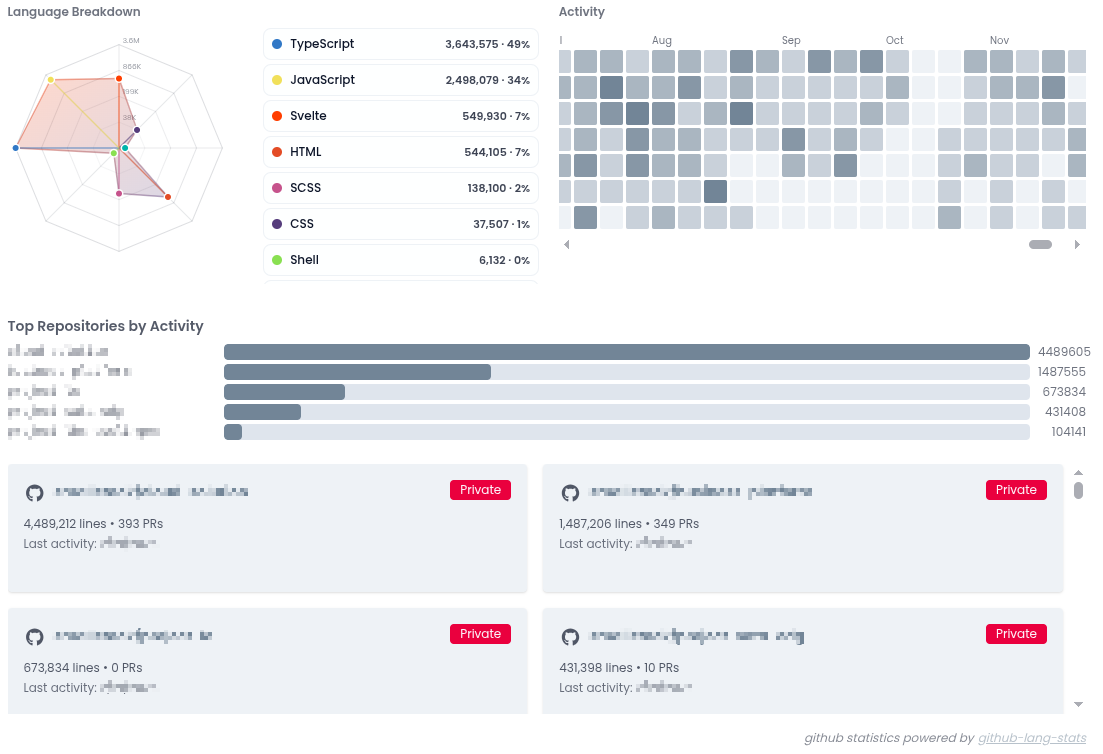
Example of how the output data can be visualized — this chart is from the IndieCV app by smallstack, built on top of the JSON data this tool produces:
Made by smallstack GmbH · GitHub · npm