
Quota, usage, and token visibility for OpenCode.






npx @slkiser/opencode-quota initImportant
OpenCode >= 1.4.3 and Node.js >= 18 are required.
The installer is append-only: it adds the plugin, asks a few display/provider questions, and leaves existing values alone.
After install:
- Restart OpenCode.
- Run
/quota. - If something looks wrong, run
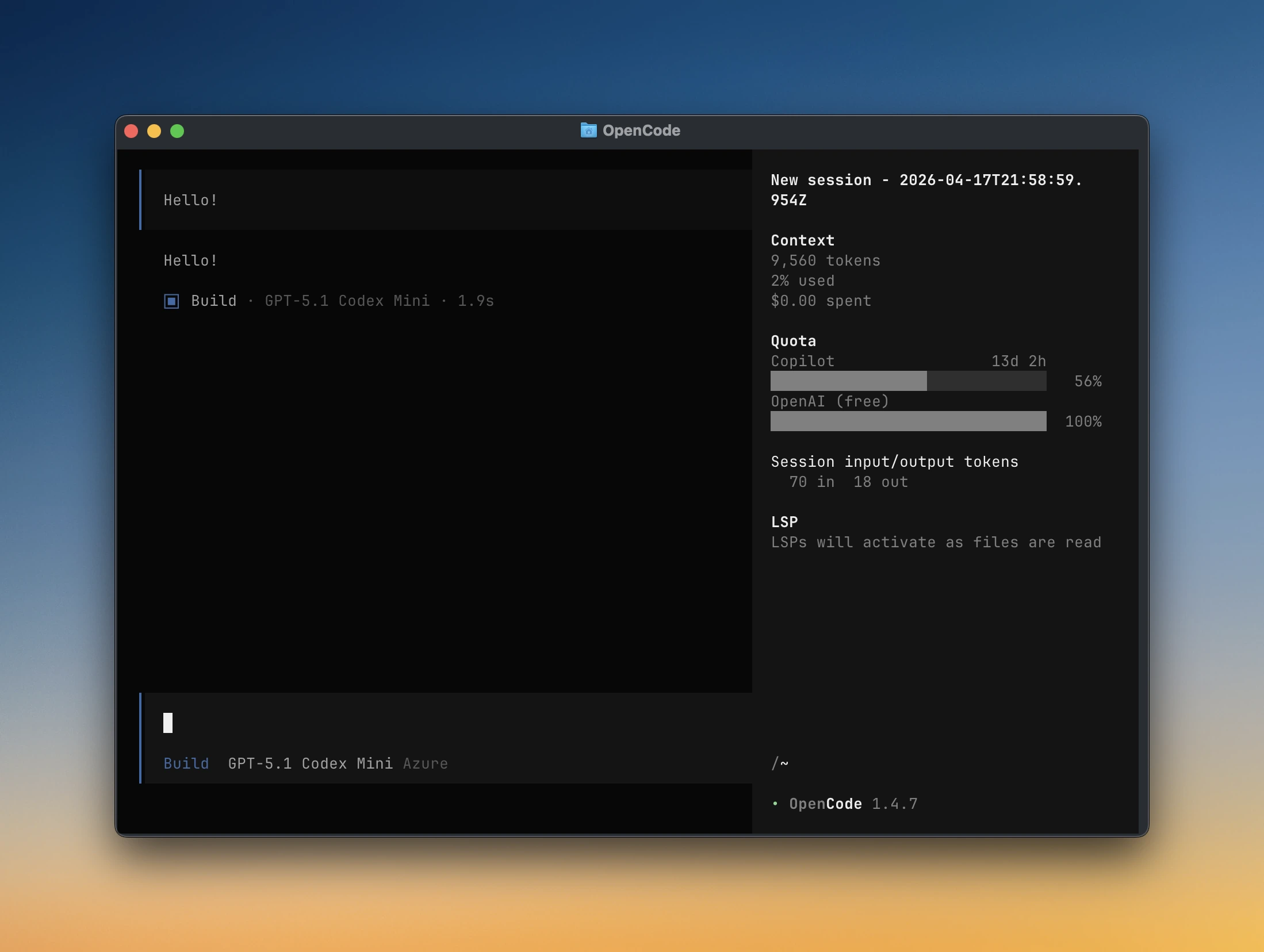
/quota_status. - If you enabled the sidebar, open the session sidebar and look for the
Quotapanel.
Terminal-only check:
Use npx when you want to run the published package without installing the binary first:
npx @slkiser/opencode-quota showUse opencode-quota directly when the package binary is already installed or on your PATH. Add --provider to show only one provider:
opencode-quota show --provider copilotAdd the server plugin to opencode.json or opencode.jsonc:
If you also want the sidebar, add the same package to the tui.json or tui.jsonc file that OpenCode loads:
{
"$schema": "https://opencode.ai/tui.json",
"plugin": ["@slkiser/opencode-quota"],
}Quota settings go in opencode-quota/quota-toast.json next to the OpenCode config file you chose during install. Existing experimental.quotaToast settings still work when no sidecar file exists. Quota settings do not live in tui.json.
Full configuration reference
| Option | Default | Meaning |
|---|---|---|
enabled |
true |
Master switch for quota collection and handled slash commands. When false, /quota, /quota_status, /pricing_refresh, and /tokens_* are handled as no-ops. |
enabledProviders |
"auto" |
Auto-detect providers, or set an explicit provider list. Unknown provider ids are reported under config_errors in /quota_status; an explicit list with no valid providers resolves to none instead of falling back to auto-detect. |
minIntervalMs |
300000 |
Minimum fetch interval between provider updates. |
requestTimeoutMs |
5000 |
Remote provider request timeout in milliseconds. Providers with custom defaults, such as Gemini CLI and OpenCode Go, keep their provider default unless this is explicitly configured. |
formatStyle |
singleWindow |
Shared quota-row style for popup toasts and the TUI sidebar: singleWindow or allWindows. Legacy classic/grouped aliases still work, and legacy toastStyle is still accepted on read for backward compatibility. |
percentDisplayMode |
remaining |
Shared percent meaning for popup toasts and the TUI sidebar: remaining renders labels like 81% left; used renders labels like 19% used or 125% used when over quota. |
onlyCurrentModel |
false |
Filter quota rows to the current model/provider when that session selection can be resolved. |
showSessionTokens |
true |
Show the Session input/output tokens section in quota displays when session token data is available. |
pricingSnapshot.source |
"auto" |
Token pricing snapshot selection for /tokens_*: auto, bundled, or runtime. |
pricingSnapshot.autoRefresh |
7 |
Refresh stale local pricing data after this many days. |
percentDisplayMode affects popup toasts and the TUI sidebar only. /quota keeps its existing remaining-oriented percentage output.
| Option | Default | Meaning |
|---|---|---|
enableToast |
true |
Show popup toasts. Disabling this does not disable /quota or the TUI sidebar. |
toastDurationMs |
9000 |
Toast duration in milliseconds. |
showOnIdle |
true |
Show a toast on the idle trigger. |
showOnQuestion |
true |
Show a toast after a question/assistant response. |
showOnCompact |
true |
Show a toast after session compaction. |
showOnBothFail |
true |
Show a fallback toast when providers attempted quota reads and all failed. |
layout.maxWidth |
50 |
Toast formatting width target. Ignored by the TUI sidebar. |
layout.narrowAt |
42 |
Toast compact-layout breakpoint. Ignored by the TUI sidebar. |
layout.tinyAt |
32 |
Toast tiny-layout breakpoint. Ignored by the TUI sidebar. |
debug |
false |
Append toast debug context when troubleshooting. |
If you want the Quota sidebar panel, you need the plugin in both OpenCode config surfaces:
| File | What goes there | Needed for sidebar? |
|---|---|---|
tui.json / tui.jsonc |
plugin: ["@slkiser/opencode-quota"] |
Yes |
opencode.json / opencode.jsonc |
Server plugin entry | Yes |
opencode-quota/quota-toast.json |
Quota settings | No, but controls quota behavior |
| Option | Default | Meaning |
|---|---|---|
anthropicBinaryPath |
"claude" |
Command/path used for local Claude CLI probing; override this for custom installs or shim locations. |
googleModels |
["CLAUDE"] |
Google model keys to query: CLAUDE, G3PRO, G3FLASH, G3IMAGE. |
opencodeGoWindows |
["rolling", "weekly", "monthly"] |
OpenCode Go usage windows to display. |
alibabaCodingPlanTier |
"lite" |
Fallback Alibaba Coding Plan tier when auth does not include tier. |
cursorPlan |
"none" |
Cursor included API budget preset: none, pro, pro-plus, ultra. |
cursorIncludedApiUsd |
unset | Override Cursor monthly included API budget in USD. |
cursorBillingCycleStartDay |
unset | Local billing-cycle anchor day 1..28; when unset, Cursor usage resets on the local calendar month. |
- TUI sidebar panel with quota rows
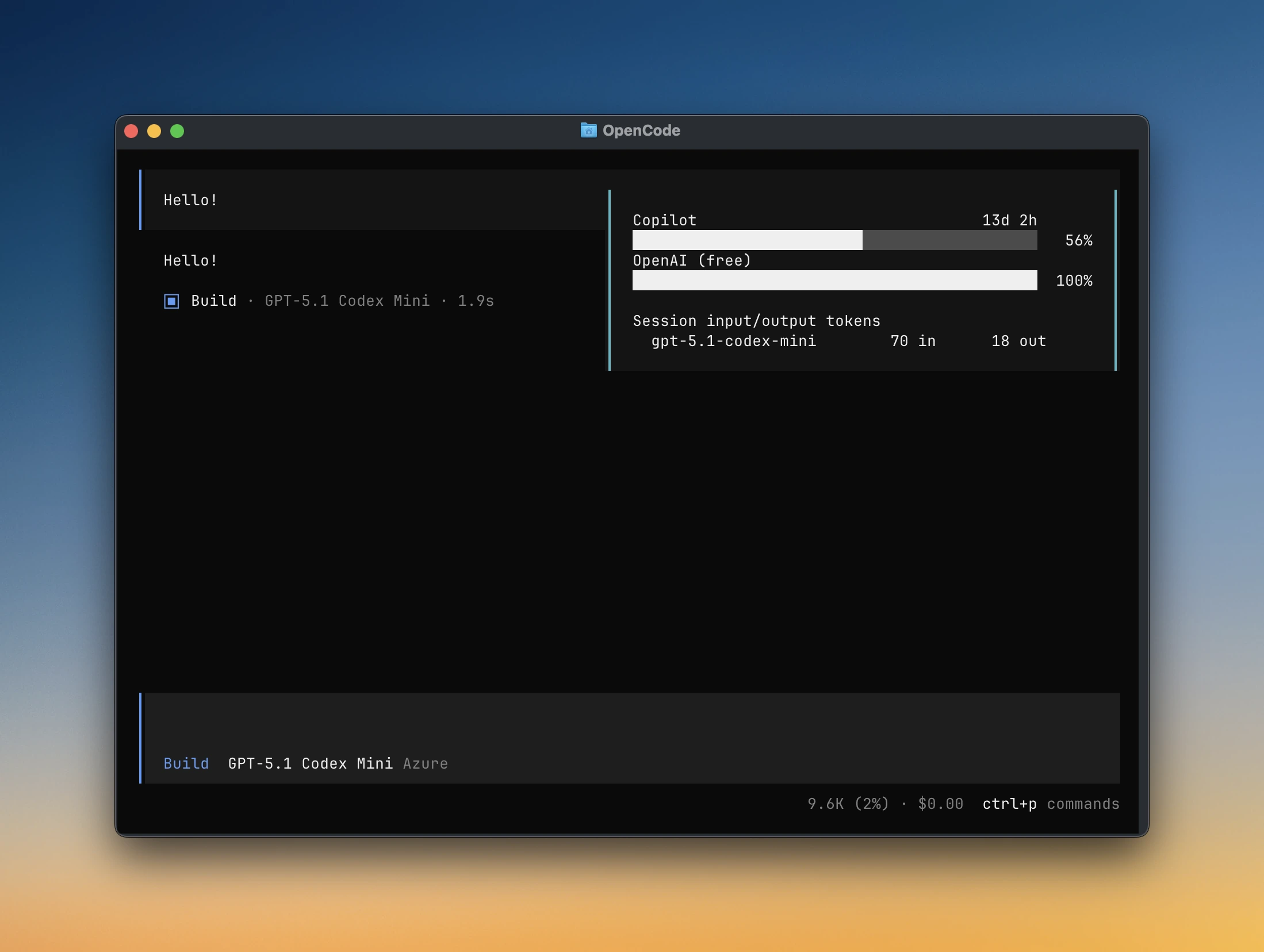
- Popup quota toasts after assistant responses
- Manual
/quota,/quota_status, and/tokens_*commands - Terminal
opencode-quota showcommand for a quota-only quick glance - Local token reports using bundled and runtime
models.devpricing - Custom quota tracking for companion plugins
|
|
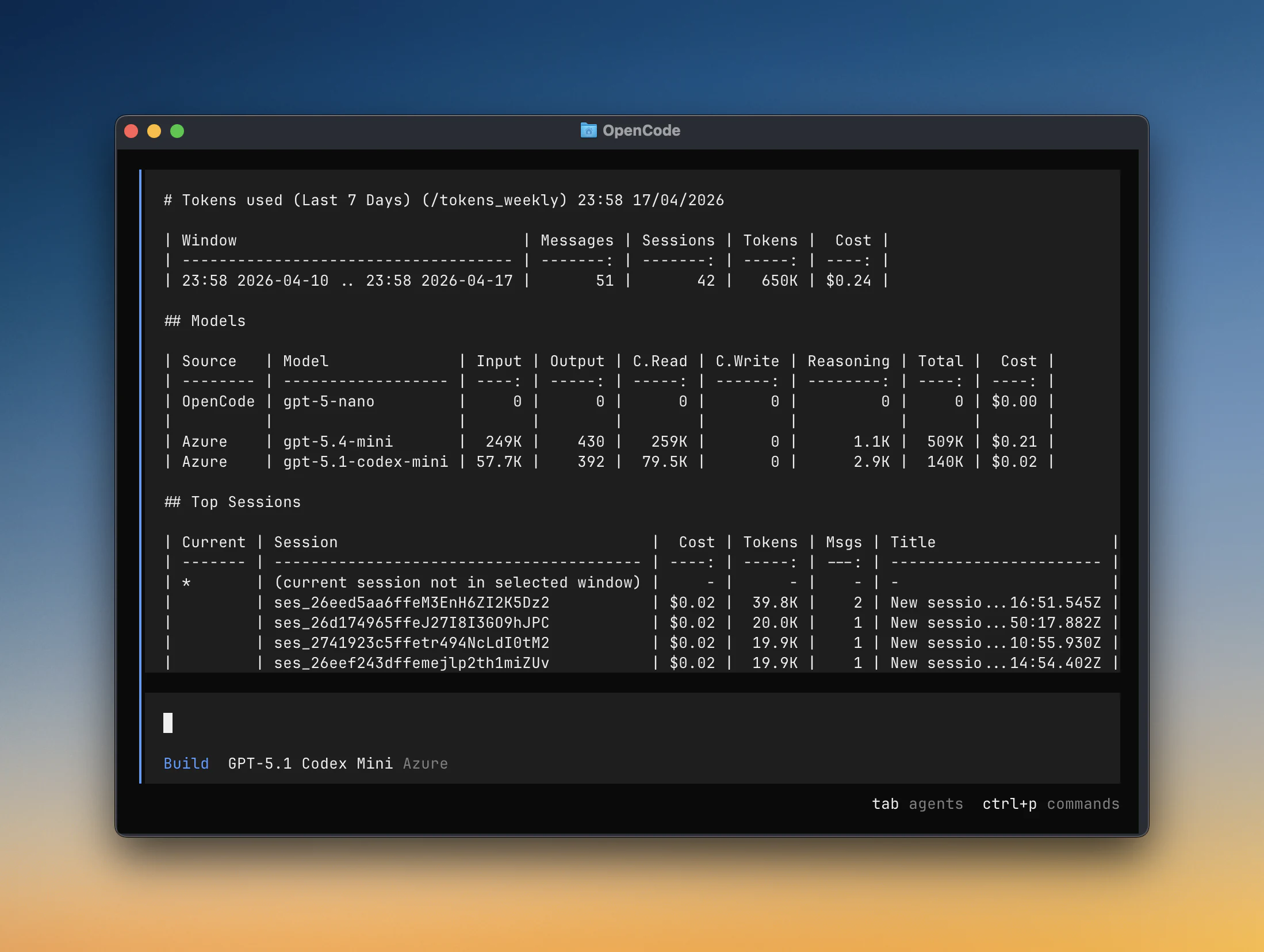
| Popup quota toast | /tokens_weekly report |
| Provider | Auto setup? | Setup / plugin order | Quota source |
|---|---|---|---|
| Anthropic (Claude) | Needs quick setup | Install and authenticate Claude CLI | Local CLI or OAuth usage |
| GitHub Copilot | Usually automatic | Existing OpenCode auth, or optional PAT config | Remote API |
| OpenAI | Automatic | Existing OpenCode OAuth | Remote API |
| Cursor | Needs quick setup | ["@playwo/opencode-cursor-oauth", "@slkiser/opencode-quota"] |
Local estimation |
| Qwen Code | Needs quick setup | ["opencode-qwencode-auth", "@slkiser/opencode-quota"] |
Local estimation |
| Alibaba Coding Plan | Automatic | Existing OpenCode auth, global config, or env | Local estimation |
| MiniMax Coding Plan | Automatic | Existing OpenCode auth, global config, or env | Remote API |
| Kimi Code | Automatic | Existing OpenCode auth, global config, or env | Remote API |
| Chutes AI | Usually automatic | Existing OpenCode auth, global config, or env | Remote API |
| Crof.ai | Manual env/config | CROF_API_KEY, CROFAI_API_KEY, or trusted user/global config |
Remote API |
| Synthetic | Automatic | Existing OpenCode auth, global config, or env | Remote API |
| Google Antigravity | Needs quick setup | ["opencode-antigravity-auth", "@slkiser/opencode-quota"] |
Remote API |
| Gemini CLI | Needs quick setup | ["opencode-gemini-auth", "@slkiser/opencode-quota"] |
Remote API |
| Z.ai Coding Plan | Automatic | Existing OpenCode auth, global config, or env | Remote API |
| NanoGPT | Usually automatic | Existing OpenCode auth, global config, or env | Remote API |
| OpenCode Go | Needs quick setup | Set workspace ID and auth cookie |
Dashboard scraping |
Providers are auto-detected by default. To choose providers explicitly, set enabledProviders in opencode-quota/quota-toast.json:
{
"enabledProviders": ["copilot", "openai", "google-gemini-cli"],
}Customize these settings in opencode-quota/quota-toast.json.
Show every quota window
Instead of the default most-constrained window:
{
"formatStyle": "allWindows",
}Choose OpenCode Go windows
Choose which OpenCode Go windows to display:
{
"opencodeGoWindows": ["rolling", "weekly", "monthly"],
}Show used percentages
Show percentages as used instead of remaining in toasts and the sidebar:
{
"percentDisplayMode": "used",
}Turn off popup toasts
Keep /quota and the sidebar enabled:
{
"enableToast": false,
}Increase request timeout
Increase the remote provider request timeout from the default 5000ms. Providers with custom defaults, such as Gemini CLI and OpenCode Go, keep their provider default unless you set this.
{
"requestTimeoutMs": 12000,
}Advanced: legacy config sync
By default, the installer writes quota settings only to opencode-quota/quota-toast.json. If you also want it to write the legacy OpenCode block, run:
npx @slkiser/opencode-quota init --sync-legacy-configThis is only for users who intentionally want experimental.quotaToast mirrored into opencode.json / opencode.jsonc.
| Command | What it shows |
|---|---|
opencode-quota show |
Terminal quota-only quick glance |
/quota |
Detailed quota report |
/quota_status |
Config, provider, auth, pricing, and live probes |
/pricing_refresh |
Refresh local runtime pricing from models.dev |
/tokens_today |
Tokens used today |
/tokens_daily |
Tokens used in the last 24 hours |
/tokens_weekly |
Tokens used in the last 7 days |
/tokens_monthly |
Tokens used in the last 30 days, including pricing |
/tokens_all |
Tokens used across all local history |
/tokens_session |
Tokens used in the current session |
/tokens_session_all |
Current session plus descendant sessions |
/tokens_between |
Tokens used between YYYY-MM-DD YYYY-MM-DD |
Install Claude Code, authenticate it, and make sure claude is on your PATH:
claude auth login
claude auth statusIf Claude lives at a custom path, set anthropicBinaryPath in opencode-quota/quota-toast.json.
Some providers need an auth companion plugin. Add the companion plugin first and @slkiser/opencode-quota second.
Companion plugin: @playwo/opencode-cursor-oauth
Add both plugins to opencode.json, with the Cursor auth plugin first:
{
"$schema": "https://opencode.ai/config.json",
"plugin": ["@playwo/opencode-cursor-oauth", "@slkiser/opencode-quota"],
"provider": {
"cursor": {
"name": "Cursor",
},
},
}Then authenticate Cursor once:
opencode auth login --provider cursorCompanion plugin: opencode-qwencode-auth
Add both plugins to opencode.json, with the Qwen auth plugin first:
{
"$schema": "https://opencode.ai/config.json",
"plugin": ["opencode-qwencode-auth", "@slkiser/opencode-quota"],
}Companion plugin: opencode-antigravity-auth
Add both plugins to opencode.json, with the Antigravity auth plugin first:
{
"$schema": "https://opencode.ai/config.json",
"plugin": ["opencode-antigravity-auth", "@slkiser/opencode-quota"],
}Companion plugin: opencode-gemini-auth
Add both plugins to opencode.json, with the Gemini auth plugin first:
{
"$schema": "https://opencode.ai/config.json",
"plugin": ["opencode-gemini-auth", "@slkiser/opencode-quota"],
}Then authenticate Google once:
opencode auth login --provider googleIf you use manual provider selection, include google-gemini-cli in enabledProviders.
OpenCode Go quota scrapes the dashboard and needs a workspace ID plus an auth cookie:
export OPENCODE_GO_WORKSPACE_ID="your-workspace-id"
export OPENCODE_GO_AUTH_COOKIE="your-auth-cookie"OpenCode Go can show 5h, Weekly, and Monthly windows. Use opencodeGoWindows in opencode-quota/quota-toast.json to choose a subset.
Environment variables take precedence over the optional opencode-go.json file. Run /quota_status to see the exact paths checked.
If quota or token data looks wrong:
- Run
/quota_status. - Confirm the expected provider appears in the detected provider list.
- Confirm OpenCode has already created
opencode.dbif token reports are empty. - Check companion plugins for Cursor, Qwen Code, Google Antigravity, and Gemini CLI.
- Use the quick-setup link in the provider table for provider-specific auth and config notes.
For companion providers, confirm the auth plugin appears before @slkiser/opencode-quota in opencode.json.
Anthropic (Claude)
Run /quota_status and check the Anthropic section.
| Symptom | Fix |
|---|---|
claude not found |
Install Claude Code and make sure claude is on your PATH. |
| Claude is installed at a custom path | Set anthropicBinaryPath in opencode-quota/quota-toast.json. |
| Not authenticated | Run claude auth login, then confirm claude auth status works. |
| Auth works but no quota rows appear | Check quota_source and message in /quota_status; re-authenticate Claude if the OAuth credential fallback is missing or stale. |
| Provider not detected | Confirm OpenCode is configured to use the anthropic provider. |
GitHub Copilot
Run /quota_status and check copilot_quota_auth, billing_mode, billing_scope, and quota_api.
| Symptom | Fix |
|---|---|
| Personal quota missing | Confirm OpenCode Copilot auth works. The plugin can read OpenCode's Copilot OAuth token. |
| Business or Enterprise quota missing | Add copilot-quota-token.json in the OpenCode runtime config directory shown by opencode debug paths. |
| PAT config exists but quota fails | Fix copilot-quota-token.json; when present, it takes precedence over OAuth and does not silently fall back. |
| Enterprise usage missing | Use a classic PAT with the required billing access. Fine-grained PATs and GitHub App tokens are not supported for Enterprise premium usage. |
OpenAI
Run /quota_status and check the OpenAI auth source and token status.
| Symptom | Fix |
|---|---|
| OpenAI quota missing | Confirm OpenCode native OpenAI OAuth is present in auth.json. |
| Token expired | Re-run OpenCode's OpenAI auth flow. |
| Provider not detected | Confirm your OpenCode config uses the openai provider or a compatible OpenAI auth entry. |
Cursor
Run /quota_status and check the Cursor section.
| Symptom | Fix |
|---|---|
| Cursor not detected | Put @playwo/opencode-cursor-oauth before @slkiser/opencode-quota in opencode.json. |
| Cursor auth missing | Run opencode auth login --provider cursor. |
| Quota appears but no remaining percentage | Set cursorPlan or cursorIncludedApiUsd in opencode-quota/quota-toast.json. |
| Billing cycle looks wrong | Set cursorBillingCycleStartDay in opencode-quota/quota-toast.json to your local billing anchor day. |
| Unknown Cursor pricing | Run /pricing_refresh; if still unknown, check /quota_status for unknown model ids. |
Qwen Code
Run /quota_status and check qwen_oauth_source, qwen_local_plan, and the qwen_code live probe section.
| Symptom | Fix |
|---|---|
| Qwen not detected | Put opencode-qwencode-auth before @slkiser/opencode-quota in opencode.json. |
| Auth missing | Complete the Qwen companion plugin auth flow. |
| Counters do not move | Confirm the current model is qwen-code/*; Qwen quota is local request estimation for matching model usage. |
| Usage looks stale | Check the local state file path shown by /quota_status. |
Alibaba Coding Plan
Run /quota_status and check the Alibaba auth, resolved tier, state-file path, and alibaba_coding_plan live probe section.
| Symptom | Fix |
|---|---|
| API key not detected | Use ALIBABA_CODING_PLAN_API_KEY, ALIBABA_API_KEY, trusted user/global OpenCode config, or OpenCode auth. Repo-local provider secrets are ignored. |
| Wrong tier | Set alibabaCodingPlanTier to lite or pro in opencode-quota/quota-toast.json. |
| Counters do not move | Confirm the current model is alibaba/* or alibaba-cn/*. |
| Quota seems stale | Check the state-file path shown in /quota_status. |
MiniMax, Kimi, Chutes AI, Crof.ai, Synthetic, Z.ai, and NanoGPT
These providers use trusted env vars, trusted user/global OpenCode config, or native OpenCode auth. Run /quota_status and check the provider-specific API-key diagnostics (Crof.ai is env/config only).
| Provider | Useful checks |
|---|---|
| MiniMax Coding Plan | Use MINIMAX_CODING_PLAN_API_KEY or MINIMAX_API_KEY; repo-local provider secrets are ignored. |
| Kimi Code | Use KIMI_API_KEY or KIMI_CODE_API_KEY; repo-local provider secrets are ignored. |
| Chutes AI | Use CHUTES_API_KEY or trusted user/global config. |
| Crof.ai | Use CROF_API_KEY, CROFAI_API_KEY, or trusted user/global config. |
| Synthetic | Use SYNTHETIC_API_KEY, trusted user/global config, or OpenCode auth. |
| Z.ai Coding Plan | Use ZAI_API_KEY or ZAI_CODING_PLAN_API_KEY; malformed fallback auth is surfaced as an auth error. |
| NanoGPT | Use NANOGPT_API_KEY, NANO_GPT_API_KEY, trusted user/global config, or OpenCode auth. |
For security, repo-local opencode.json / opencode.jsonc is ignored for provider secrets in these integrations. Put secrets in environment variables or trusted user/global config.
Google Antigravity
Run /quota_status and check the google_antigravity section.
| Symptom | Fix |
|---|---|
| Companion missing | Put opencode-antigravity-auth before @slkiser/opencode-quota in opencode.json. |
| Accounts not found | Check the selected antigravity-accounts.json path shown by /quota_status. |
| Refresh tokens invalid | Re-authenticate with the companion plugin. |
| Provider returns no rows | Check live_probe, live_entry_*, and live_error_* in /quota_status. |
Gemini CLI
Run /quota_status and check the Gemini CLI live probe rows.
| Symptom | Fix |
|---|---|
| Companion missing | Put opencode-gemini-auth before @slkiser/opencode-quota in opencode.json. |
| Provider not enabled in manual mode | Include google-gemini-cli in enabledProviders in opencode-quota/quota-toast.json. |
| Auth missing | Run opencode auth login --provider google. |
| Project missing | Set provider.google.options.projectId, OPENCODE_GEMINI_PROJECT_ID, GOOGLE_CLOUD_PROJECT, or GOOGLE_CLOUD_PROJECT_ID. |
OpenCode Go
Run /quota_status and check the opencode_go section.
| Symptom | Fix |
|---|---|
| Config not detected | Set both OPENCODE_GO_WORKSPACE_ID and OPENCODE_GO_AUTH_COOKIE, then rerun /quota_status. |
| Incomplete config | workspaceId and authCookie must come from the same source. |
| Scrape returns no data | Refresh the browser auth cookie from opencode.ai. |
| Selected window missing | Check /quota_status for selected_windows and live_fetch_error; remove unavailable windows from opencodeGoWindows in opencode-quota/quota-toast.json or refresh the dashboard cookie. |
| Dashboard format changed | This integration scrapes the dashboard, so it can break if the dashboard markup changes. |
Token Reports
Run /quota_status and check pricing snapshot health plus OpenCode database paths.
| Symptom | Fix |
|---|---|
/tokens_* is empty |
Start OpenCode once so it creates opencode.db, then run a session with model usage. |
| Pricing looks stale | Run /pricing_refresh. |
| Runtime pricing does not change output | Check pricingSnapshot.source in opencode-quota/quota-toast.json; bundled keeps packaged pricing active. |
| Cursor model has unknown pricing | Run /pricing_refresh; Cursor auto and composer* use bundled deterministic pricing. |
Please use the Bug report or Feature request templates when opening issues. Freeform issues, or bug/feature issues missing the required template sections, may be automatically commented on and closed.
MIT
OpenCode Quota is not built by the OpenCode team and is not affiliated with OpenCode or any provider listed above.
{
  "$schema": "https://opencode.ai/config.json",
  "plugin": ["@slkiser/opencode-quota"],
}