Summary File Format
The summary file is the manually created text file used to specify how the contents of the MakeMkv logs map to the items on the disc.
The summary file should be named according to the disc they map to:
discxx-summary.txt
where xx is the disc number.
The following fields can be copy/pasted from MakeMkv directly. For best results, feel free to edit the Name and File name fields to better values before copy/pasting values.
You can copy/pasted the fields from the following area of the MakeMKV UI:
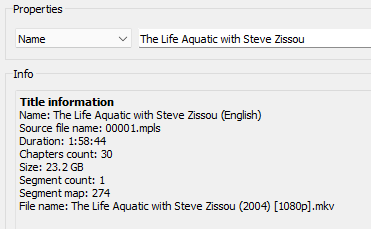
and it becomes:
Name: The Life Aquatic with Steve Zissou
Source file name: 00001.mpls
Duration: 1:58:44
Chapters count: 30
Size: 23.2 GB
Segment count: 1
Segment map: 274
File name: The Life Aquatic with Steve Zissou (2004) [1080p].mkv
Note that MakeMKV often places a language in the Title field like the (English) in the screen shot above. This should be removed and will produce a warning in ImportBuddy when trying to finalize a release.
Type is a required field which specifies the type of track you are mapping. The possible values are:
- MainMovie - Used for the main movie on a disc. It is possible that there can be several main movies - for example multiple movies on a single disc or multiple versions of the same movie.
- DeletedScene - Deleted or extended scenes
- Trailer - Trailers or promotional tv spots
- Extra - Any supplemental feature which does not fall in other categories
-
Episode - Used only for episodic content like TV shows (Note:
SeasonandEpisodefields are required if theTypefield is Episode)
- Season - Specifies which season the content belongs to.
-
Episode - Specifies which episode the content belongs to. For combined episodes, this can be a range like
5-6
Note: It is possible an item (like an Extra) belongs to a given season but not a specific episode. For example, a featurette for a given season of a show. In this case you should specify a Season and leave out the Episode
** Chapters
Any item type can have optional chapters. Chapters begin with a Chapter: followed by a series of chapter names beginning with a -:
Chapters:
-Chapter Name 1
-Chapter Name 2
These fields can be specified in some cases but are not required.
- Year - you can specify a year along with a movie or episode. This is helps with the import processes but is not currently stored anywhere in the DiscDb database
- Upc - This is an optional way of storing the UPC for an item in the summary file rather than the discxx.json file.
- Description - Provide any extra details about an item on the disc. Often times this text can come from the menus on the disc.