You signed in with another tab or window. Reload to refresh your session.You signed out in another tab or window. Reload to refresh your session.You switched accounts on another tab or window. Reload to refresh your session.Dismiss alert
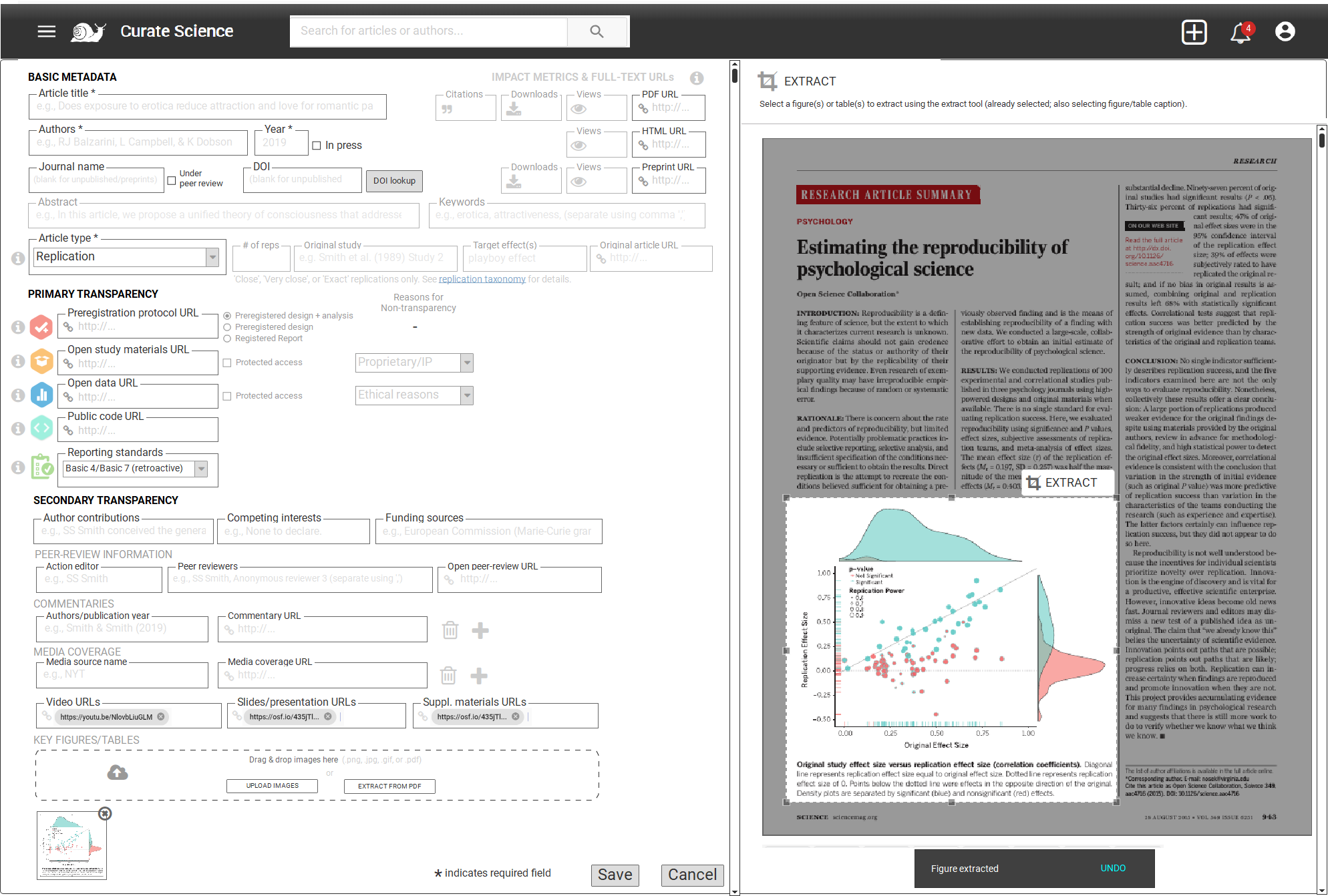
uploading an article PDF file via "EXTRACT FROM PDF" button will load the PDF in a side panel to the right (probably using a component similar to what will be used for the full-screen mode, see full-screen mode details #63 ), superimposing an image cropper tool so users can manually extract each desired image w/ corresponding figure/table caption (using existing image-extraction-from-PDF-libraries (eg minecart or PyPDF3 (or other options mentioned in this stackoverflow post))
"EXTRACT" button hidden upon extraction, and only re-appears once selection box is moved?? (or just keep visible, and if user attempts to extract again w/out moving, yield error message that this part of PDF/screenshot already extracted??) (selection/crop tool behavior similar to https://pdfresizer.com/crop)
new thought: perhaps a more cost-effective solution (for now) is to implement the "PRINT SCREEN" approach, which may be easier to implement and work with a larger # of use cases (i.e., print screen from an in-browser PDF, or local PDF, or in-browser HTML article, etc.....) (need to think more about this... advantage of PDF, being one can scroll down PDF and extract additional figures/tables...)
NOTE: the 2 aforementioned libraries do offer automatic detection & extraction of images embedded within a PDF, which could be displayed to users, which they could then select. however, i don't believe it also extracts figure captions (though maybe based on this), so we might have to resort to manual extraction for now? and even if it did, users also need to be able to extract tables (& table captions) as images, but i haven't found any automatic-table-extraction-from-PDF libraries (except tabula-py or camelot, but i believe these only extract tables from PDF to json or CSV rather than outputting to an image file).
extract figures directly from PDF functionality
NOTE: the 2 aforementioned libraries do offer automatic detection & extraction of images embedded within a PDF, which could be displayed to users, which they could then select. however, i don't believe it also extracts figure captions (though maybe based on this), so we might have to resort to manual extraction for now? and even if it did, users also need to be able to extract tables (& table captions) as images, but i haven't found any automatic-table-extraction-from-PDF libraries (except tabula-py or camelot, but i believe these only extract tables from PDF to json or CSV rather than outputting to an image file).