Open
Conversation


This file contains hidden or bidirectional Unicode text that may be interpreted or compiled differently than what appears below. To review, open the file in an editor that reveals hidden Unicode characters.
Learn more about bidirectional Unicode characters
Sign up for free
to join this conversation on GitHub.
Already have an account?
Sign in to comment
1 participant

Add this suggestion to a batch that can be applied as a single commit.This suggestion is invalid because no changes were made to the code.Suggestions cannot be applied while the pull request is closed.Suggestions cannot be applied while viewing a subset of changes.Only one suggestion per line can be applied in a batch.Add this suggestion to a batch that can be applied as a single commit.Applying suggestions on deleted lines is not supported.You must change the existing code in this line in order to create a valid suggestion.Outdated suggestions cannot be applied.This suggestion has been applied or marked resolved.Suggestions cannot be applied from pending reviews.Suggestions cannot be applied on multi-line comments.Suggestions cannot be applied while the pull request is queued to merge.Suggestion cannot be applied right now. Please check back later.
Description
This extension adds wind swaying ability and optional GPU instancing to 3D objects (trees, grass, bushes) with frustum and distance culling.
How to use the extension
How to use:
Import your 3D object (tree, bush, grass...) and add the Foliage swaying behavior to it.
Choose from various object settings and parameters, then add the object to your scene.
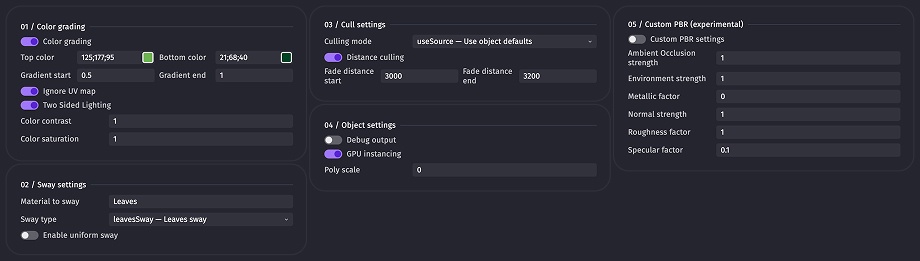
Add the Update foliage sway action, choose its parameters, and run it every frame.

Optionally use the Set wind gust action at the beginning of the scene.

Play your scene.
Checklist
Example file
NatureElementsDemo.zip
Please do not redestribute.
Extension file
NatureElements.zip
Extension by @baldieandbaldie-commits
You can update the extension on this "Pull Request" by commenting the update command: in the comment field, type
!update, then drag and drop a zip file with your extension file in the commenting field, like how you initially submitted the extension. It should look like this:It can take a few seconds for the file to fully upload and show as the above. Once it is like shown above, click "Comment" and let the bot do the rest!