Skip to content

Offline feedback and errors for optimistic room rows#11655

Merged
neil-marcellini merged 22 commits into
mainfrom
neil-pending-rooms
Oct 25, 2022
Merged

Offline feedback and errors for optimistic room rows#11655
neil-marcellini merged 22 commits into
mainfrom
neil-pending-rooms

Conversation

@neil-marcellini

@neil-marcellini neil-marcellini commented Oct 6, 2022

Copy link
Copy Markdown
Contributor

Details

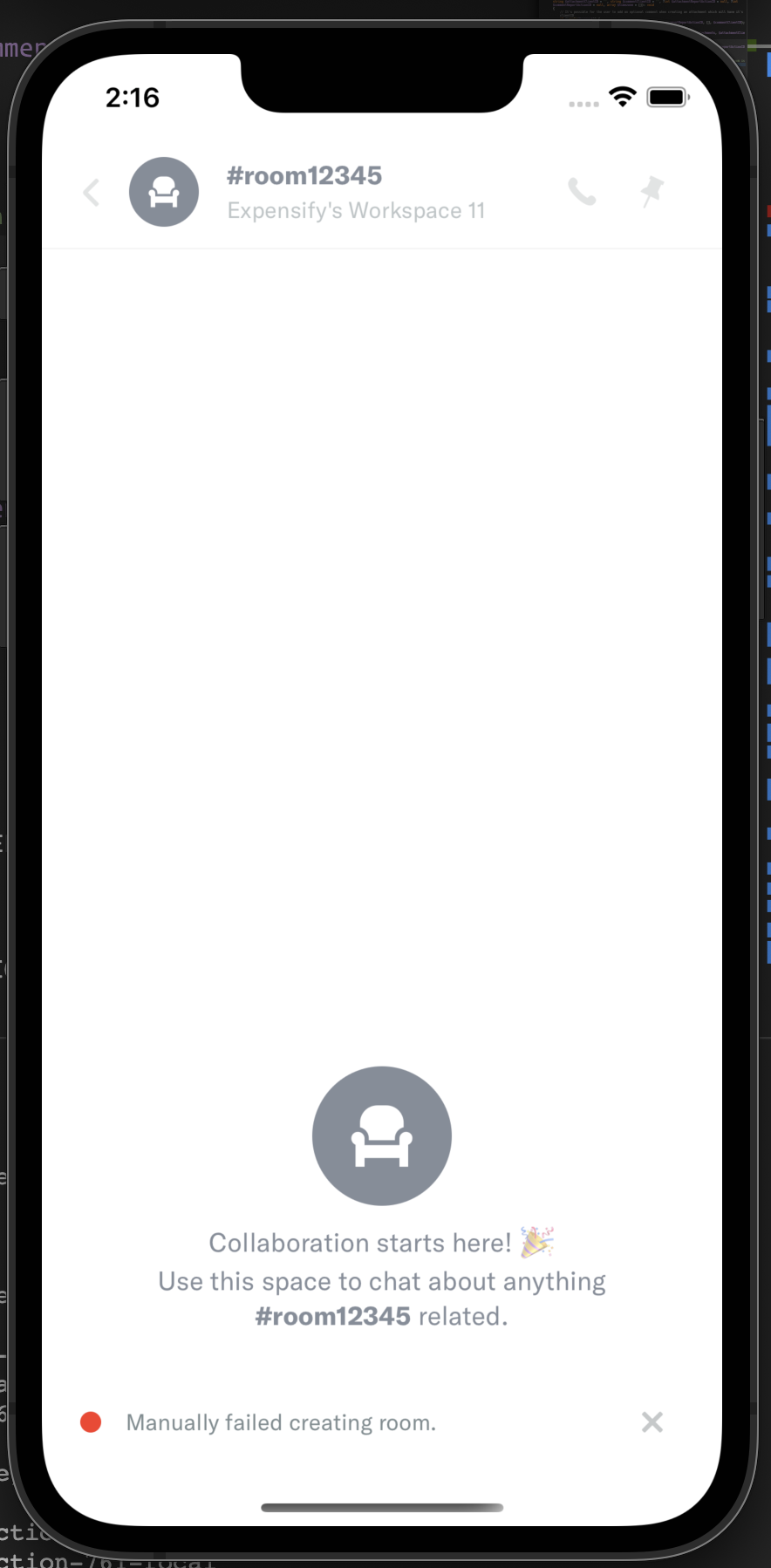
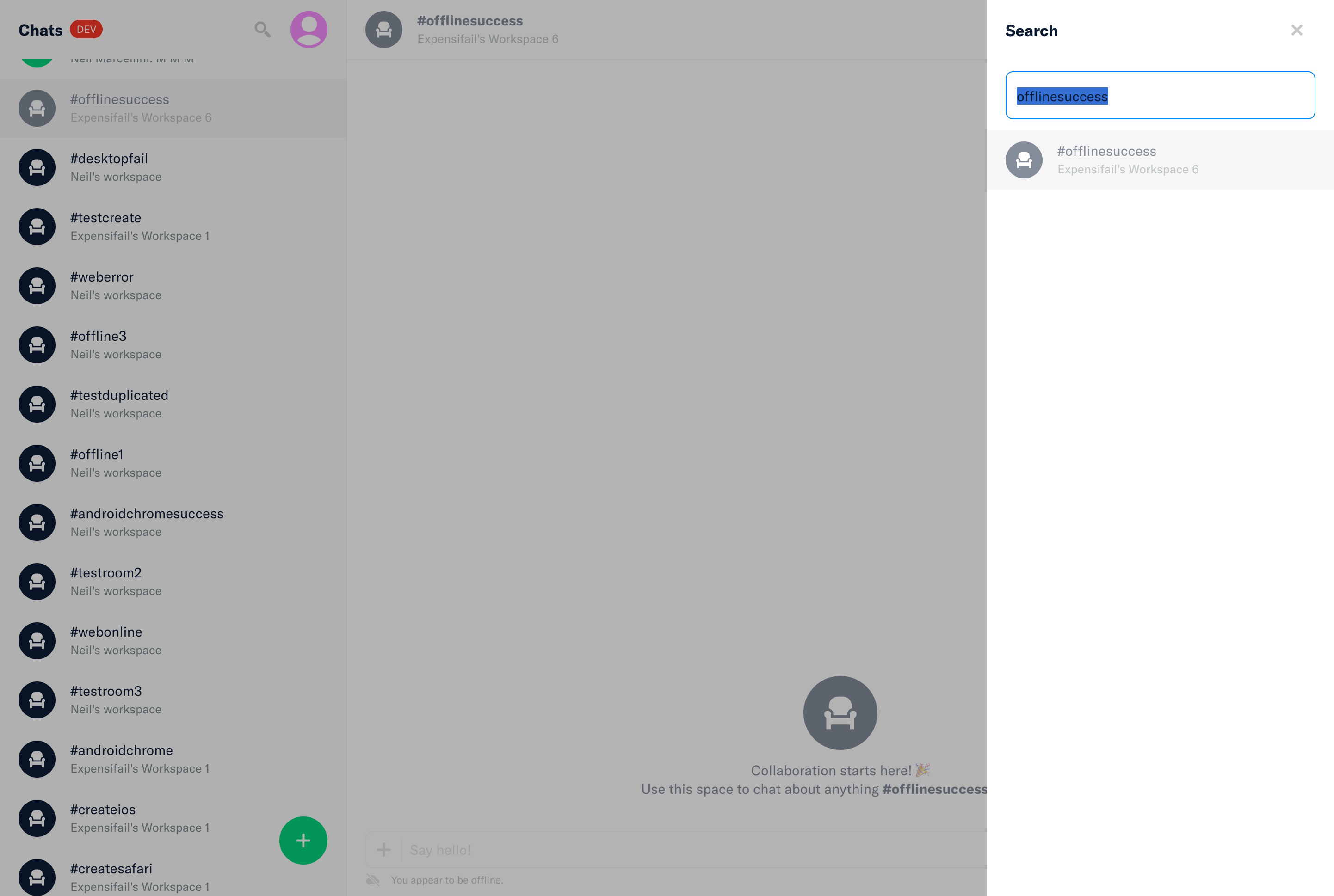
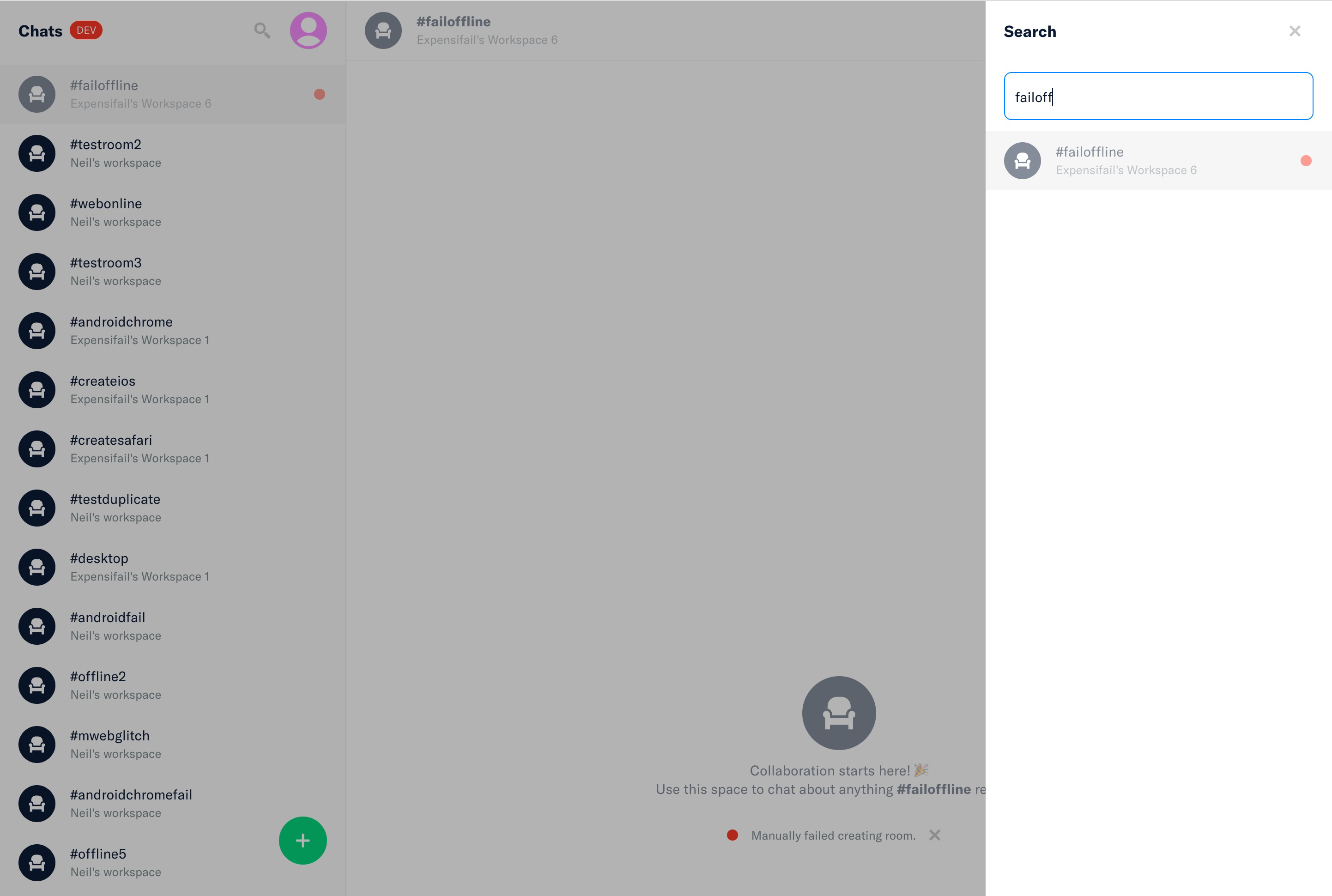
I have wrapped the OptionRowLHN and the search OptionRow components in OfflineWithFeedback so they they are grayed out (50% opacity) while pending creation offline, and when creation fails.

I added a pendingAction key and an allReportErrors key to the options for use with the OfflineWithFeedback component. For now I set the pendingAction only for adding the workspace room, but it can be updated to be a combination of more fields in the future.

To set allReportErrors I combined all the error sources related to a report into one big object of error messages keyed by microtime. I set the brickRoadIndicator based on whether allReportErrors is empty.

I also added one new prop to OfflineWithFeedback to handle cases where we want a component to be grayed out when needed, but we don't want to show the error messages under it. Before I achieved that by putting display none of the error messages container. It's better to render the messages only when we need them by setting shouldShowErrorMessages to false.

Related Issues

$ https://github.com/Expensify/Expensify/issues/232287

Tests

Offline success

  1. If needed, create a workspace by clicking the green plus, new workspace
  2. Go offline
  3. Click the green plus, new room
  4. Fill out the form and hit save
  5. Verify that you are navigated to the new room and the whole page is grayed out
  6. Find the room row in the LHN and verify that it is grayed out
  7. Click the search icon in the header and type in the room name, then verify that it is grayed out (50% opacity)
  8. Go online
  9. Verify that the room row in the LHN is not grayed out
  10. Verify that the room row in the search is not grayed out

Offline error

  1. If needed, create a workspace by clicking the green plus, new workspace
  2. Go offline
  3. Click the green plus, new room
  4. Fill out the form with a name (#ffroom), workspace, and hit save
  5. Verify that you are navigated to the new room and the whole page is grayed out
  6. Find the room row in the LHN and verify that it is grayed out
  7. Click the search icon in the header and type in the room name, then verify that it is grayed out (50% opacity)
  8. Close the search page
  9. Sign into the same account on another device or incognito window
  10. Create another workspace room on the same workspace with the same name (#ffroom)
  11. Go back to the other device and go back online
  12. Verify that a red dot shows up on the room row in the LHN and it is grayed out
  13. Verify that a red dot shows up on the room row in search and it is grayed out
  • Verify that no errors appear in the JS console

PR Review Checklist

PR Author Checklist

  • I linked the correct issue in the ### Fixed Issues section above
  • I wrote clear testing steps that cover the changes made in this PR
    • I added steps for local testing in the Tests section
    • I added steps for Staging and/or Production testing in the QA steps section
    • I added steps to cover failure scenarios (i.e. verify an input displays the correct error message if the entered data is not correct)
    • I turned off my network connection and tested it while offline to ensure it matches the expected behavior (i.e. verify the default avatar icon is displayed if app is offline)
  • I included screenshots or videos for tests on all platforms
  • I ran the tests on all platforms & verified they passed on:
    • iOS / native
    • Android / native
    • iOS / Safari
    • Android / Chrome
    • MacOS / Chrome
    • MacOS / Desktop
  • I verified there are no console errors (if there's a console error not related to the PR, report it or open an issue for it to be fixed)
  • I followed proper code patterns (see Reviewing the code)
    • I verified that any callback methods that were added or modified are named for what the method does and never what callback they handle (i.e. toggleReport and not onIconClick)
    • I verified that comments were added to code that is not self explanatory
    • I verified that any new or modified comments were clear, correct English, and explained "why" the code was doing something instead of only explaining "what" the code was doing.
    • I verified any copy / text shown in the product was added in all src/languages/* files
    • I verified any copy / text that was added to the app is correct English and approved by marketing by adding the Waiting for Copy label for a copy review on the original GH to get the correct copy.
    • I verified proper file naming conventions were followed for any new files or renamed files. All non-platform specific files are named after what they export and are not named "index.js". All platform-specific files are named for the platform the code supports as outlined in the README.
    • I verified the JSDocs style guidelines (in STYLE.md) were followed
  • If a new code pattern is added I verified it was agreed to be used by multiple Expensify engineers
  • I followed the guidelines as stated in the Review Guidelines
  • I tested other components that can be impacted by my changes (i.e. if the PR modifies a shared library or component like Avatar, I verified the components using Avatar are working as expected)
  • I verified all code is DRY (the PR doesn't include any logic written more than once, with the exception of tests)
  • I verified any variables that can be defined as constants (ie. in CONST.js or at the top of the file that uses the constant) are defined as such
  • If a new component is created I verified that:
    • A similar component doesn't exist in the codebase
    • All props are defined accurately and each prop has a /** comment above it */
    • The file is named correctly
    • The component has a clear name that is non-ambiguous and the purpose of the component can be inferred from the name alone
    • The only data being stored in the state is data necessary for rendering and nothing else
    • For Class Components, any internal methods passed to components event handlers are bound to this properly so there are no scoping issues (i.e. for onClick={this.submit} the method this.submit should be bound to this in the constructor)
    • Any internal methods bound to this are necessary to be bound (i.e. avoid this.submit = this.submit.bind(this); if this.submit is never passed to a component event handler like onClick)
    • All JSX used for rendering exists in the render method
    • The component has the minimum amount of code necessary for its purpose, and it is broken down into smaller components in order to separate concerns and functions
  • If a new CSS style is added I verified that:
    • A similar style doesn't already exist
    • The style can't be created with an existing StyleUtils function (i.e. StyleUtils.getBackgroundAndBorderStyle(themeColors.componentBG)
  • If the PR modifies a generic component, I tested and verified that those changes do not break usages of that component in the rest of the App (i.e. if a shared library or component like Avatar is modified, I verified that Avatar is working as expected in all cases)
  • If the PR modifies a component related to any of the existing Storybook stories, I tested and verified all stories for that component are still working as expected.
  • I have checked off every checkbox in the PR author checklist, including those that don't apply to this PR.

PR Reviewer Checklist

The reviewer will copy/paste it into a new comment and complete it after the author checklist is completed

  • I have verified the author checklist is complete (all boxes are checked off).
  • I verified the correct issue is linked in the ### Fixed Issues section above
  • I verified testing steps are clear and they cover the changes made in this PR
    • I verified the steps for local testing are in the Tests section
    • I verified the steps for Staging and/or Production testing are in the QA steps section
    • I verified the steps cover any possible failure scenarios (i.e. verify an input displays the correct error message if the entered data is not correct)
    • I turned off my network connection and tested it while offline to ensure it matches the expected behavior (i.e. verify the default avatar icon is displayed if app is offline)
  • I checked that screenshots or videos are included for tests on all platforms
  • I verified tests pass on all platforms & I tested again on:
    • iOS / native
    • Android / native
    • iOS / Safari
    • Android / Chrome
    • MacOS / Chrome
    • MacOS / Desktop
  • If there are any errors in the console that are unrelated to this PR, I either fixed them (preferred) or linked to where I reported them in Slack
  • I verified proper code patterns were followed (see Reviewing the code)
    • I verified that any callback methods that were added or modified are named for what the method does and never what callback they handle (i.e. toggleReport and not onIconClick).
    • I verified that comments were added to code that is not self explanatory
    • I verified that any new or modified comments were clear, correct English, and explained "why" the code was doing something instead of only explaining "what" the code was doing.
    • I verified any copy / text shown in the product was added in all src/languages/* files
    • I verified any copy / text that was added to the app is correct English and approved by marketing by tagging the marketing team on the original GH to get the correct copy.
    • I verified proper file naming conventions were followed for any new files or renamed files. All non-platform specific files are named after what they export and are not named "index.js". All platform-specific files are named for the platform the code supports as outlined in the README.
    • I verified the JSDocs style guidelines (in STYLE.md) were followed
  • If a new code pattern is added I verified it was agreed to be used by multiple Expensify engineers
  • I verified that this PR follows the guidelines as stated in the Review Guidelines
  • I verified other components that can be impacted by these changes have been tested, and I retested again (i.e. if the PR modifies a shared library or component like Avatar, I verified the components using Avatar have been tested & I retested again)
  • I verified all code is DRY (the PR doesn't include any logic written more than once, with the exception of tests)
  • I verified any variables that can be defined as constants (ie. in CONST.js or at the top of the file that uses the constant) are defined as such
  • If a new component is created I verified that:
    • A similar component doesn't exist in the codebase
    • All props are defined accurately and each prop has a /** comment above it */
    • Any functional components have the displayName property
    • The file is named correctly
    • The component has a clear name that is non-ambiguous and the purpose of the component can be inferred from the name alone
    • The only data being stored in the state is data necessary for rendering and nothing else
    • For Class Components, any internal methods passed to components event handlers are bound to this properly so there are no scoping issues (i.e. for onClick={this.submit} the method this.submit should be bound to this in the constructor)
    • Any internal methods bound to this are necessary to be bound (i.e. avoid this.submit = this.submit.bind(this); if this.submit is never passed to a component event handler like onClick)
    • All JSX used for rendering exists in the render method
    • The component has the minimum amount of code necessary for its purpose, and it is broken down into smaller components in order to separate concerns and functions
  • If a new CSS style is added I verified that:
    • A similar style doesn't already exist
    • The style can't be created with an existing StyleUtils function (i.e. StyleUtils.getBackgroundAndBorderStyle(themeColors.componentBG)
  • If the PR modifies a generic component, I tested and verified that those changes do not break usages of that component in the rest of the App (i.e. if a shared library or component like Avatar is modified, I verified that Avatar is working as expected in all cases)
  • If the PR modifies a component related to any of the existing Storybook stories, I tested and verified all stories for that component are still working as expected.
  • I have checked off every checkbox in the PR reviewer checklist, including those that don't apply to this PR.

QA Steps

Run the tests above.

  • Verify that no errors appear in the JS console

Screenshots

Web

Offline creation pending
image

Room creation failed grayed out in LHN and search
image

Mobile Web - Chrome

Offline pending creation success
https://user-images.githubusercontent.com/26260477/194970136-9617a0f6-40c6-40d9-a73d-b19ceb63daff.mov

Creation failed
https://user-images.githubusercontent.com/26260477/194970147-dd3a7346-16ad-4291-9324-81660ea946c7.mov

Mobile Web - Safari

Offline pending creation success
https://user-images.githubusercontent.com/26260477/194969401-d6f1d6e9-8845-4a6d-9ae1-ddb753a24ca9.mp4

Creation failed
https://user-images.githubusercontent.com/26260477/194969367-aec9c1ae-207f-474a-9824-6387ae3574a3.mp4

Desktop

Offline pending creation success
https://user-images.githubusercontent.com/26260477/195216730-505fb005-6450-472b-ad06-44bc2fd011a0.mov

Creation failed
https://user-images.githubusercontent.com/26260477/195216743-1060f31e-8c69-4059-b853-a649192e8666.mov

iOS

Offline pending creation success
https://user-images.githubusercontent.com/26260477/194968404-91eefdb0-128a-4645-abb2-353d65c962f4.mp4

Creation failed
https://user-images.githubusercontent.com/26260477/194968755-9d2952bf-391b-4465-9d80-c31b3e0000bd.mp4

Android

Offline pending creation success

android-success.mov

Creation failed

android-fail.mov

@neil-marcellini neil-marcellini self-assigned this Oct 6, 2022
@neil-marcellini

Copy link
Copy Markdown
Contributor Author

I still need to check off 2 boxes and figure out why the jest unit tests are failing, but reviews can begin.

@neil-marcellini neil-marcellini marked this pull request as ready for review October 11, 2022 23:50
@neil-marcellini neil-marcellini requested a review from a team as a code owner October 11, 2022 23:50
@melvin-bot melvin-bot Bot requested review from marcochavezf and removed request for a team October 11, 2022 23:51
Comment thread src/components/OfflineWithFeedback.js Outdated

@marcochavezf marcochavezf left a comment

Copy link
Copy Markdown
Contributor

Choose a reason for hiding this comment

The reason will be displayed to describe this comment to others. Learn more.

Looks good to me so far 👍🏽 just a minor comment

@neil-marcellini

Copy link
Copy Markdown
Contributor Author

Ready for reviews again. I think I have thoroughly addressed all comments.

@neil-marcellini

Copy link
Copy Markdown
Contributor Author

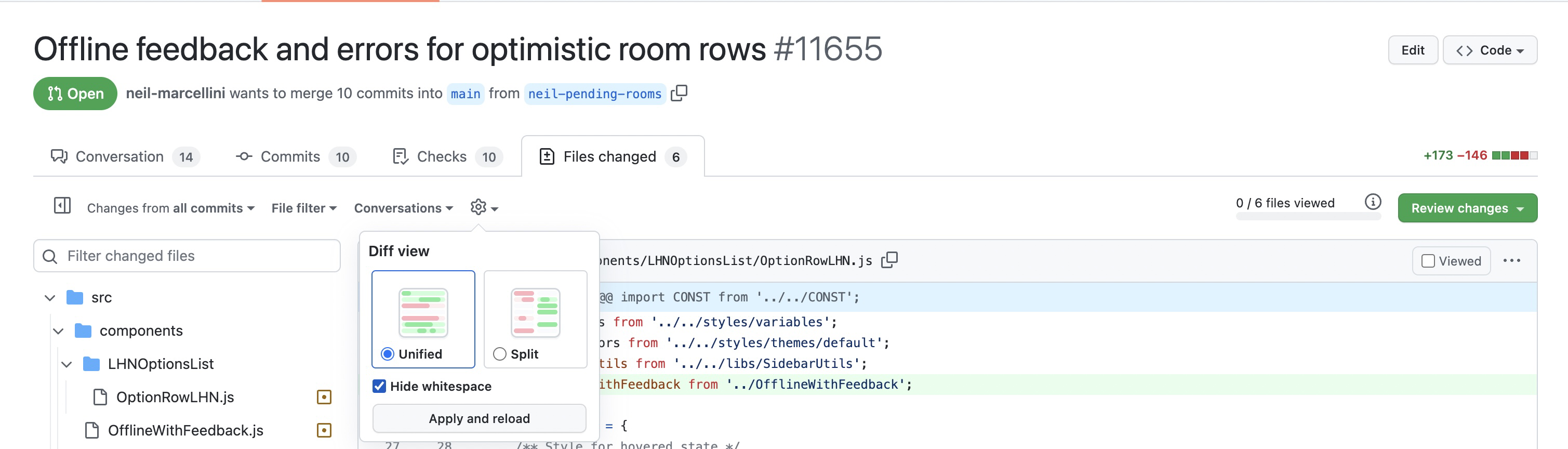
I merged main to fix conflicts. Note, I would recommend viewing the diff without whitespace for an easier time reviewing because there are a lot of indentation changes.
image

Comment thread src/components/OfflineWithFeedback.js Outdated
const needsOpacity = (isOfflinePendingAction && !isUpdateOrDeleteError) || isAddError;
const needsStrikeThrough = props.network.isOffline && props.pendingAction === 'delete';
const hideChildren = !props.network.isOffline && props.pendingAction === 'delete' && !hasErrors;
const showErrorMessages = props.shouldShowErrorMessages && hasErrors && !_.isEmpty(props.errors);

Copy link
Copy Markdown
Contributor

Choose a reason for hiding this comment

The reason will be displayed to describe this comment to others. Learn more.

hasErrors already has that condition

Suggested change
const showErrorMessages = props.shouldShowErrorMessages && hasErrors && !_.isEmpty(props.errors);
const showErrorMessages = props.shouldShowErrorMessages && hasErrors;

result.isPolicyExpenseChat = ReportUtils.isPolicyExpenseChat(report);
result.shouldShowSubscript = result.isPolicyExpenseChat && !report.isOwnPolicyExpenseChat && !result.isArchivedRoom;
result.brickRoadIndicator = getBrickRoadIndicatorStatusForReport(report, reportActions);
result.pendingAction = report.pendingFields ? report.pendingFields.addWorkspaceRoom : null;

Copy link
Copy Markdown
Contributor

Choose a reason for hiding this comment

The reason will be displayed to describe this comment to others. Learn more.

😕 what is addWorkspaceRoom doing here? Isn't this a generic component?

@neil-marcellini neil-marcellini Oct 19, 2022

Copy link
Copy Markdown
Contributor Author

Choose a reason for hiding this comment

The reason will be displayed to describe this comment to others. Learn more.

I added a pendingAction key to the options for use with the OfflineWithFeedback component. For now I set the pendingAction only for adding the workspace room, but it can be updated to be a combination of more fields in the future.

That's from my description of the PR. Yes createOption is called several times by getOptions, which is used by getSearchOptions, getNewChatOptions, and getMemberInviteOptions. What's the harm in setting a pendingAction? What would you suggest instead?

Copy link
Copy Markdown
Contributor

Choose a reason for hiding this comment

The reason will be displayed to describe this comment to others. Learn more.

My confusion comes from: we only need to show RBR in the LHN, no? Wouldn't this make it show in all those other places too?

Copy link
Copy Markdown
Contributor Author

Choose a reason for hiding this comment

The reason will be displayed to describe this comment to others. Learn more.

We need to show the RBR / 50% opacity in the LHN and the search. It won't apply for a new chat, and I don't think it will apply for the member invite options, but I haven't confirmed that. Thanks for raising this point, because I should look into that. I will test / explain whether it applies for the member invite or not.

Copy link
Copy Markdown
Contributor Author

Choose a reason for hiding this comment

The reason will be displayed to describe this comment to others. Learn more.

createOption is called several times by getOptions, which is used by getSearchOptions, getNewChatOptions, and getMemberInviteOptions.

The pendingAction should be set for rooms when calling getSearchOptions.

getNewChatOptions only returns reports with a single participant. It skips options without a login.

// Check the report to see if it has a single participant and if the participant is already selected
if (reportOption.login && _.some(loginOptionsToExclude, option => option.login === reportOption.login)) {
continue;
}

The login is only set when creating the option if the report doesn't have multiple participants.

if (!hasMultipleParticipants) {
result.login = personalDetail.login;
result.phoneNumber = personalDetail.phoneNumber;
result.payPalMeAddress = personalDetail.payPalMeAddress;
}

hasMultipleParticipants is always true for chatRooms.

hasMultipleParticipants = personalDetailList.length > 1 || result.isChatRoom || result.isPolicyExpenseChat;

For getMemberInviteOptions we do not pass reports to getOptions so we won't access any rooms.

function getMemberInviteOptions(
personalDetails,
betas = [],
searchValue = '',
excludeLogins = [],
) {
return getOptions([], personalDetails, {
betas,
searchValue: searchValue.trim(),
excludeDefaultRooms: true,
includePersonalDetails: true,
excludeLogins,
sortPersonalDetailsByAlphaAsc: false,
});
}

So in summary we will only have a pendingAction for rooms in the LHN and search, as intended.

Comment thread src/libs/SidebarUtils.js
Comment thread src/components/OfflineWithFeedback.js Outdated
@neil-marcellini

Copy link
Copy Markdown
Contributor Author

Sorry for all the confusion with this PR. Let's get this back on track and moving forward again. Here are my goals.

  1. Gray out optimistic workspace room rows in the LHN and search page while pending creation offline, and when creation fails.
  2. Use OfflineWithFeedback to achieve goal 1 and do so without rendering error messages, instead of hiding them with display none.
  3. Use OfflineWithFeedback to achieve goal 1 without passing all of the possible report errors.
  4. Keep OfflineWithFeedback relatively simple and logical.

Goal 3 is probably a premature optimization as @iwiznia hinted at here. I could do something like this, but that's also strange.

<OfflineWithFeedback
    pendingAction={optionItem.pendingAction}
    errors={!_.isEmpty(optionItem.brickRoadIndicator) ? {hasErrors: true} : null}
    shouldShowErrorMessages={false}
>

I'll go ahead and write a function to get all possible errors on a report, similar to how the errors are accessed in getBrickRoadIndicatorStatusForReport, and then pass all those errors to OfflineWithFeedback. I'll remove the hasErrors prop and the associated changes. The use in OptionRowLHN will look like this.

<OfflineWithFeedback
    pendingAction={optionItem.pendingAction}
    errors={ReportUtils.getAllErrors(props.reportID)}
    shouldShowErrorMessages={false}
>

Does that sound good?

@neil-marcellini

Copy link
Copy Markdown
Contributor Author

My above plan was approved in Slack here so I'm going to push those changes now.

@neil-marcellini

Copy link
Copy Markdown
Contributor Author

Ok there's a problem with my plan which is that the OptionRow and OptionRowLHN components do not currently have access to the report and reportActions, which are needed for getAllReportErrors.

I could write getAllReportErrors in OptionsListUtils since it already subscribes to reportActions, and then add an Onyx subscription to ONYXKEYS.COLLECTION.REPORT. However, that violates the convention in that file which is to take in a report parameter.

I could also subscribe to both report and reportActions in ReportUtils, but again that violates convention.

Instead I think I will add a reportErrors key to the option object, and I will set it right above this line.

result.brickRoadIndicator = getBrickRoadIndicatorStatusForReport(report, reportActions);

@neil-marcellini

Copy link
Copy Markdown
Contributor Author

I'm having trouble writing the getAllReportErrors function. It should return an object of error messages keyed by microtime. To create that I need to merge together report.errors, all errors objects stored under report.errorFields, and all errors objects stored in the report actions.

I've been tinkering around with underscore.js trying to figure out how to do this.

@neil-marcellini

Copy link
Copy Markdown
Contributor Author

Ready for another review 🙇

@marcochavezf

marcochavezf commented Oct 22, 2022

Copy link
Copy Markdown
Contributor
  • I have verified the author checklist is complete (all boxes are checked off).
  • I verified the correct issue is linked in the ### Fixed Issues section above
  • I verified testing steps are clear and they cover the changes made in this PR
    • I verified the steps for local testing are in the Tests section
    • I verified the steps for Staging and/or Production testing are in the QA steps section
    • I verified the steps cover any possible failure scenarios (i.e. verify an input displays the correct error message if the entered data is not correct)
    • I turned off my network connection and tested it while offline to ensure it matches the expected behavior (i.e. verify the default avatar icon is displayed if app is offline)
  • I checked that screenshots or videos are included for tests on all platforms
  • I included screenshots or videos for tests on all platforms
  • I verified tests pass on all platforms & I tested again on:
    • iOS / native
    • Android / native
    • iOS / Safari
    • Android / Chrome
    • MacOS / Chrome
    • MacOS / Desktop
  • If there are any errors in the console that are unrelated to this PR, I either fixed them (preferred) or linked to where I reported them in Slack
  • I verified proper code patterns were followed (see Reviewing the code)
    • I verified that any callback methods that were added or modified are named for what the method does and never what callback they handle (i.e. toggleReport and not onIconClick).
    • I verified that comments were added to code that is not self explanatory
    • I verified that any new or modified comments were clear, correct English, and explained "why" the code was doing something instead of only explaining "what" the code was doing.
    • I verified any copy / text shown in the product was added in all src/languages/* files
    • I verified any copy / text that was added to the app is correct English and approved by marketing by adding the Waiting for Copy label for a copy review on the original GH to get the correct copy.
    • I verified proper file naming conventions were followed for any new files or renamed files. All non-platform specific files are named after what they export and are not named "index.js". All platform-specific files are named for the platform the code supports as outlined in the README.
    • I verified the JSDocs style guidelines (in STYLE.md) were followed
  • If a new code pattern is added I verified it was agreed to be used by multiple Expensify engineers
  • I verified that this PR follows the guidelines as stated in the Review Guidelines
  • I verified other components that can be impacted by these changes have been tested, and I retested again (i.e. if the PR modifies a shared library or component like Avatar, I verified the components using Avatar have been tested & I retested again)
  • I verified all code is DRY (the PR doesn't include any logic written more than once, with the exception of tests)
  • I verified any variables that can be defined as constants (ie. in CONST.js or at the top of the file that uses the constant) are defined as such
  • If a new component is created I verified that:
    • A similar component doesn't exist in the codebase
    • All props are defined accurately and each prop has a /** comment above it */
    • The file is named correctly
    • The component has a clear name that is non-ambiguous and the purpose of the component can be inferred from the name alone
    • The only data being stored in the state is data necessary for rendering and nothing else
    • For Class Components, any internal methods passed to components event handlers are bound to this properly so there are no scoping issues (i.e. for onClick={this.submit} the method this.submit should be bound to this in the constructor)
    • Any internal methods bound to this are necessary to be bound (i.e. avoid this.submit = this.submit.bind(this); if this.submit is never passed to a component event handler like onClick)
    • All JSX used for rendering exists in the render method
    • The component has the minimum amount of code necessary for its purpose, and it is broken down into smaller components in order to separate concerns and functions
  • If a new CSS style is added I verified that:
    • A similar style doesn't already exist
    • The style can't be created with an existing StyleUtils function (i.e. StyleUtils.getBackgroundAndBorderStyle(themeColors.componentBG)
  • If the PR modifies a generic component, I tested and verified that those changes do not break usages of that component in the rest of the App (i.e. if a shared library or component like Avatar is modified, I verified that Avatar is working as expected in all cases)
  • If the PR modifies a component related to any of the existing Storybook stories, I tested and verified all stories for that component are still working as expected.
  • I have checked off every checkbox in the PR reviewer checklist, including those that don't apply to this PR.

Screenshots

Web

Screen.Recording.2022-10-21.at.20.02.40.mov

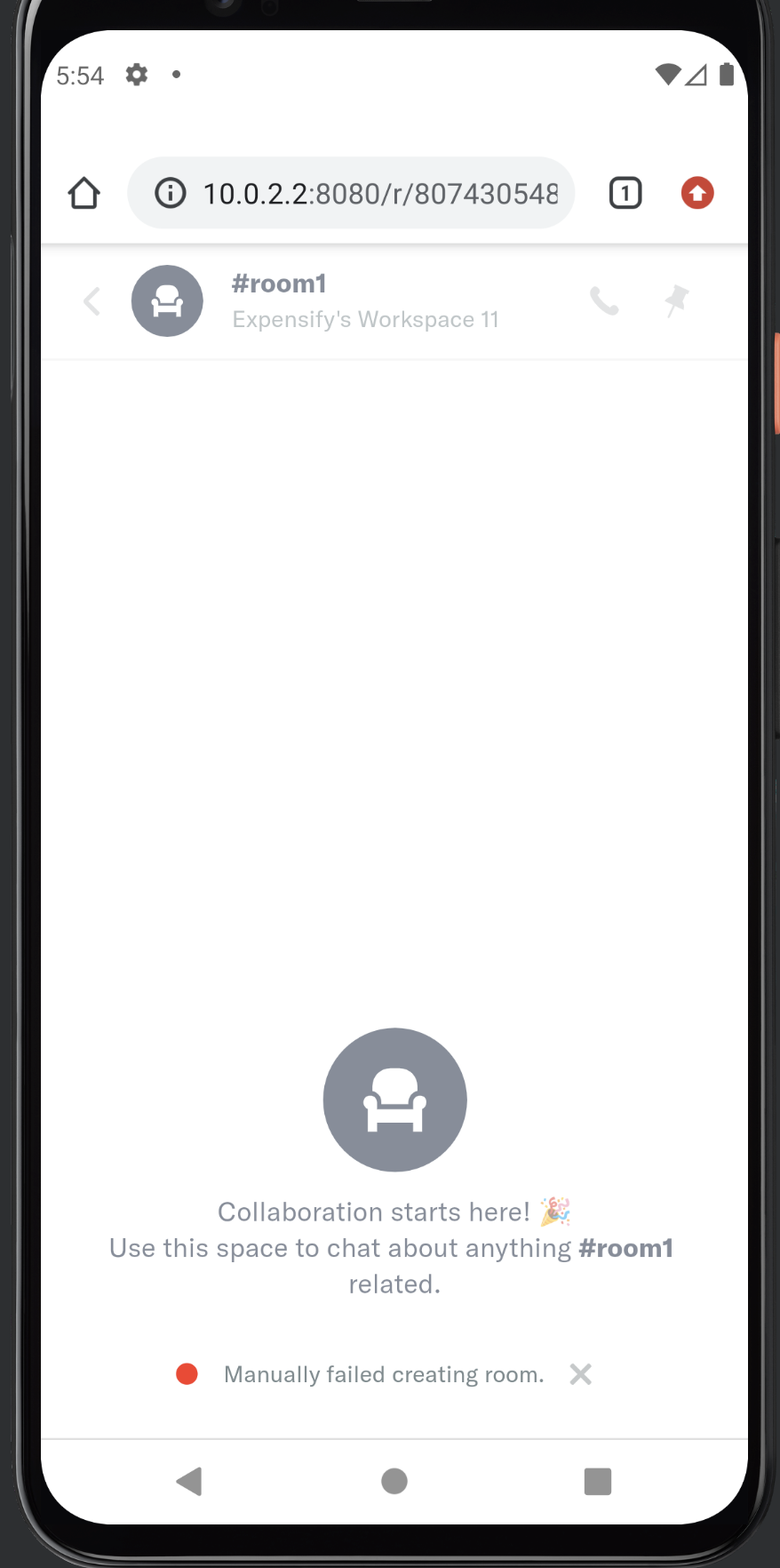
Mobile Web - Chrome

Screen Shot 2022-10-24 at 17 54 18

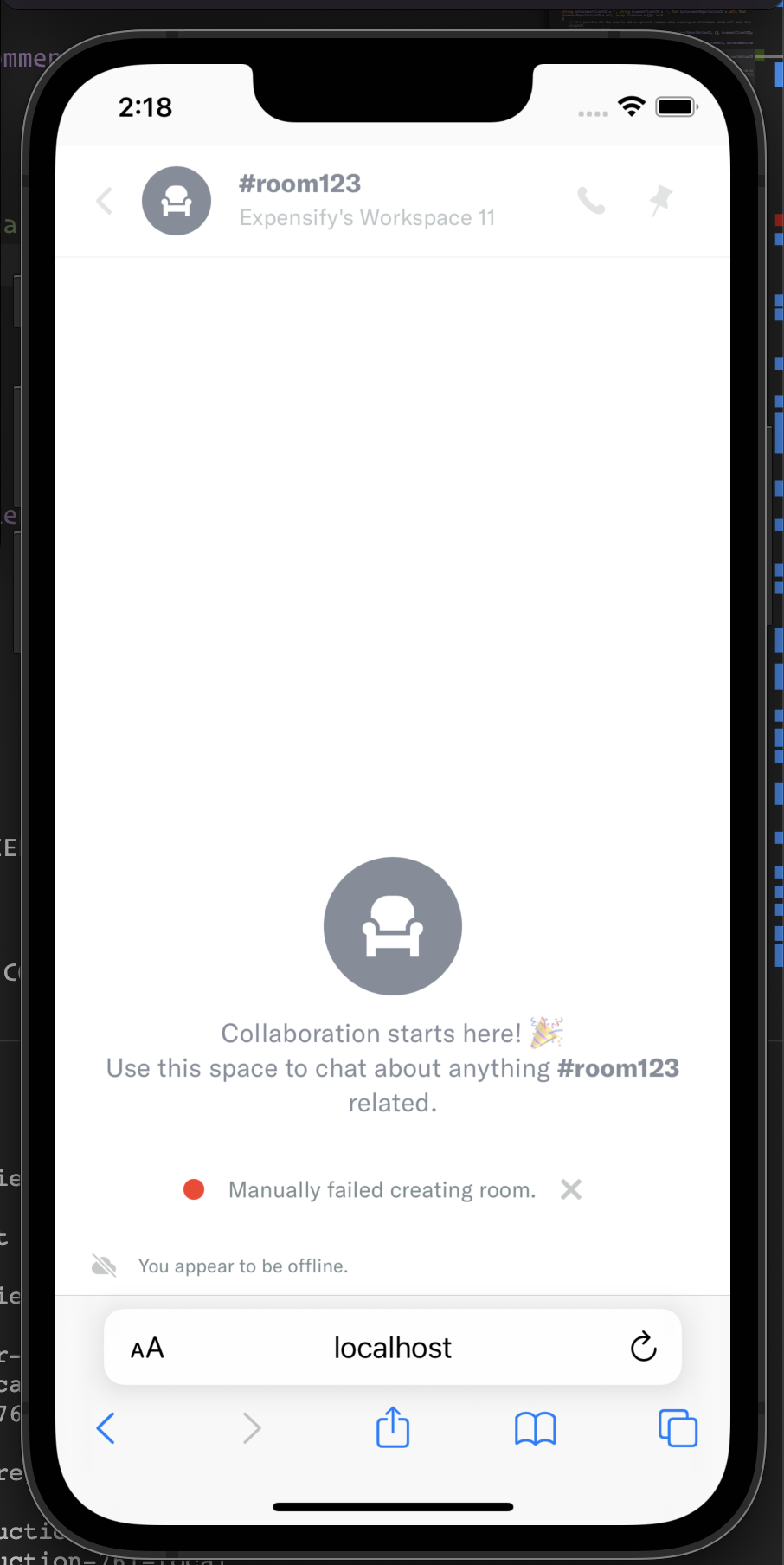
Mobile Web - Safari

Screen Shot 2022-10-22 at 14 18 20

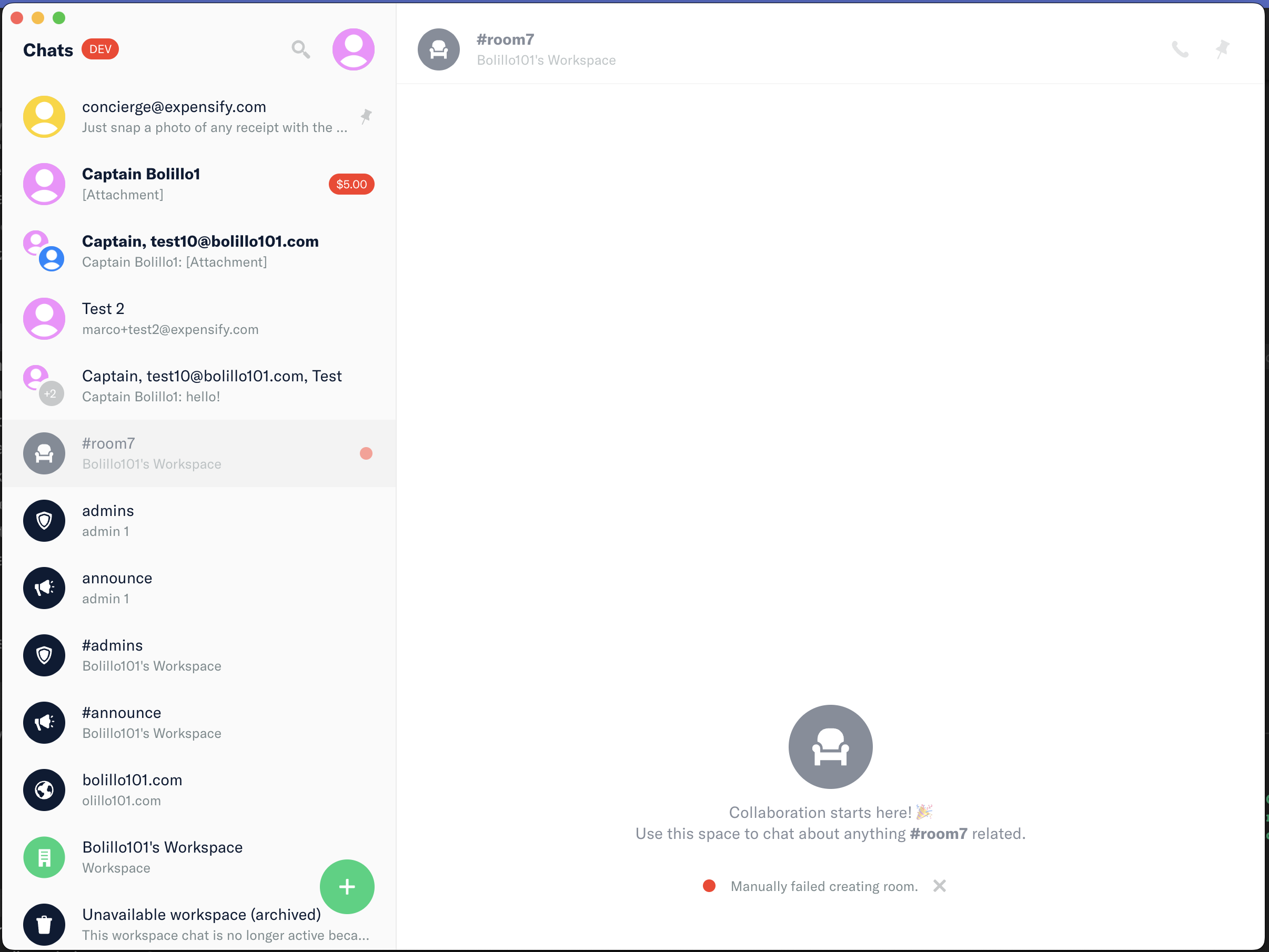
Desktop

Screen Shot 2022-10-22 at 14 40 10

iOS

Screen Shot 2022-10-22 at 14 16 05

Android

Screen.Recording.2022-10-21.at.21.03.35.mov

@marcochavezf

marcochavezf commented Oct 22, 2022

Copy link
Copy Markdown
Contributor

The code LGTM, I'm still testing on all platforms.

I found a weird behavior on iOS (which probably is not related to this PR) is that the RBR indicator appears after I open the room chat (disabled my mac's wifi):

Screen.Recording.2022-10-21.at.21.23.51.mov

And on Safari the error never showed up:

Screen.Recording.2022-10-21.at.21.37.43.mov

Edit: For some reason the network status is not changing on the iOS simulator when I disabled the wifi (I wonder if there's an issue with the NetInfo library 🤔 ), but I can reproduce the failure case for the room creation by restarting the app / browser. The only pending platform is Android / Chrome, the app is not loading locally for me (seems something is broken in my emulator).

Comment thread src/libs/OptionsListUtils.js Outdated
@neil-marcellini

Copy link
Copy Markdown
Contributor Author

Thanks for reviewing and starting the checklist @marcochavezf!

Edit: For some reason the network status is not changing on the iOS simulator when I disabled the wifi (I wonder if there's an issue with the NetInfo library 🤔 ),

Yeah offline testing on the iOS simulator doesn't really work. I had this PR up to add a switch to toggle offline mode for convenient testing, but it never actually got merged. You can try using the changes in that PR for testing. I'll put up another PR for it soon.

Please DM me if you have questions about testing. I'll look into why that jest unit test is not passing.

@marcochavezf

Copy link
Copy Markdown
Contributor

Cool, thanks @neil-marcellini, I recreated the Android emulator to test on Mobile Chrome and everything looks good 👍🏽

@neil-marcellini

Copy link
Copy Markdown
Contributor Author

Sweet. I figured out what was wrong with the tests so it should be good to go now!

marcochavezf
marcochavezf previously approved these changes Oct 25, 2022
iwiznia
iwiznia previously approved these changes Oct 25, 2022

@iwiznia iwiznia left a comment

Copy link
Copy Markdown
Contributor

Choose a reason for hiding this comment

The reason will be displayed to describe this comment to others. Learn more.

NAB

Comment thread src/libs/OptionsListUtils.js Outdated
const allReportErrors = {};
_.chain(errorSources)
.filter(errors => !_.isEmpty(errors))
.each(errors => _.extend(allReportErrors, errors));

Copy link
Copy Markdown
Contributor

Choose a reason for hiding this comment

The reason will be displayed to describe this comment to others. Learn more.

Is this really doing a reduce? I think so, right? Wouldn't it be better to use the reduce method to make code clearer?

Copy link
Copy Markdown
Contributor Author

Choose a reason for hiding this comment

The reason will be displayed to describe this comment to others. Learn more.

Oh yeah good point. I'm on it.

@neil-marcellini neil-marcellini merged commit 9950642 into main Oct 25, 2022
@neil-marcellini neil-marcellini deleted the neil-pending-rooms branch October 25, 2022 17:43
@OSBotify

Copy link
Copy Markdown
Contributor

✋ This PR was not deployed to staging yet because QA is ongoing. It will be automatically deployed to staging after the next production release.

@OSBotify

Copy link
Copy Markdown
Contributor

🚀 Deployed to staging by @neil-marcellini in version: 1.2.20-0 🚀

platform result
🤖 android 🤖 success ✅
🖥 desktop 🖥 success ✅
🍎 iOS 🍎 success ✅
🕸 web 🕸 success ✅

@OSBotify

Copy link
Copy Markdown
Contributor

🚀 Deployed to production by @chiragsalian in version: 1.2.20-3 🚀

platform result
🤖 android 🤖 success ✅
🖥 desktop 🖥 success ✅
🍎 iOS 🍎 success ✅
🕸 web 🕸 success ✅

Sign up for free to join this conversation on GitHub. Already have an account? Sign in to comment

Labels

None yet

Projects

None yet

Development

Successfully merging this pull request may close these issues.

4 participants