Skip to content

Add Pattern B to creating Personal Bank Account#10953

Closed
ctkochan22 wants to merge 49 commits into
mainfrom
ckt_refactor_PBA_patternb
Closed

Add Pattern B to creating Personal Bank Account#10953
ctkochan22 wants to merge 49 commits into
mainfrom
ckt_refactor_PBA_patternb

Conversation

@ctkochan22

@ctkochan22 ctkochan22 commented Sep 13, 2022

Copy link
Copy Markdown

cc @MariaHCD @nkuoch

Details

We are adding pattern b to creating a Personal Bank Account.

Hold https://github.com/Expensify/Web-Expensify/pull/34855

Features:

  • We now show pending bank accounts in ONYX data after they successfully log into plaid
  • If there is an error with the PBA, we will show the red brick road

Fixed Issues

$ https://github.com/Expensify/Expensify/issues/214739

Tests

Same as QA

PR Review Checklist

Contributor (PR Author) Checklist

  • I linked the correct issue in the ### Fixed Issues section above
  • I wrote clear testing steps that cover the changes made in this PR
    • I added steps for local testing in the Tests section
    • I added steps for Staging and/or Production testing in the QA steps section
    • I added steps to cover failure scenarios (i.e. verify an input displays the correct error message if the entered data is not correct)
    • I turned off my network connection and tested it while offline to ensure it matches the expected behavior (i.e. verify the default avatar icon is displayed if app is offline)
  • I included screenshots or videos for tests on all platforms
  • I ran the tests on all platforms & verified they passed on:
    • iOS / native
    • Android / native
    • iOS / Safari
    • Android / Chrome
    • MacOS / Chrome
    • MacOS / Desktop
  • I verified there are no console errors (if there's a console error not related to the PR, report it or open an issue for it to be fixed)
  • I followed proper code patterns (see Reviewing the code)
    • I verified that any callback methods that were added or modified are named for what the method does and never what callback they handle (i.e. toggleReport and not onIconClick)
    • I verified that comments were added to code that is not self explanatory
    • I verified that any new or modified comments were clear, correct English, and explained "why" the code was doing something instead of only explaining "what" the code was doing.
    • I verified any copy / text shown in the product was added in all src/languages/* files
    • I verified any copy / text that was added to the app is correct English and approved by marketing by tagging the marketing team on the original GH to get the correct copy.
    • I verified proper file naming conventions were followed for any new files or renamed files. All non-platform specific files are named after what they export and are not named "index.js". All platform-specific files are named for the platform the code supports as outlined in the README.
    • I verified the JSDocs style guidelines (in STYLE.md) were followed
  • If a new code pattern is added I verified it was agreed to be used by multiple Expensify engineers
  • I followed the guidelines as stated in the Review Guidelines
  • I tested other components that can be impacted by my changes (i.e. if the PR modifies a shared library or component like Avatar, I verified the components using Avatar are working as expected)
  • I verified all code is DRY (the PR doesn't include any logic written more than once, with the exception of tests)
  • I verified any variables that can be defined as constants (ie. in CONST.js or at the top of the file that uses the constant) are defined as such
  • If a new component is created I verified that:
    • A similar component doesn't exist in the codebase
    • All props are defined accurately and each prop has a /** comment above it */
    • Any functional components have the displayName property
    • The file is named correctly
    • The component has a clear name that is non-ambiguous and the purpose of the component can be inferred from the name alone
    • The only data being stored in the state is data necessary for rendering and nothing else
    • For Class Components, any internal methods passed to components event handlers are bound to this properly so there are no scoping issues (i.e. for onClick={this.submit} the method this.submit should be bound to this in the constructor)
    • Any internal methods bound to this are necessary to be bound (i.e. avoid this.submit = this.submit.bind(this); if this.submit is never passed to a component event handler like onClick)
    • All JSX used for rendering exists in the render method
    • The component has the minimum amount of code necessary for its purpose, and it is broken down into smaller components in order to separate concerns and functions
  • If a new CSS style is added I verified that:
    • A similar style doesn't already exist
    • The style can't be created with an existing StyleUtils function (i.e. StyleUtils.getBackgroundAndBorderStyle(themeColors.componentBG)
  • If the PR modifies a generic component, I tested and verified that those changes do not break usages of that component in the rest of the App (i.e. if a shared library or component like Avatar is modified, I verified that Avatar is working as expected in all cases)
  • If the PR modifies a component related to any of the existing Storybook stories, I tested and verified all stories for that component are still working as expected.
  • I have checked off every checkbox in the PR author checklist, including those that don't apply to this PR.

PR Reviewer Checklist

The Contributor+ will copy/paste it into a new comment and complete it after the author checklist is completed

  • I have verified the author checklist is complete (all boxes are checked off).
  • I verified the correct issue is linked in the ### Fixed Issues section above
  • I verified testing steps are clear and they cover the changes made in this PR
    • I verified the steps for local testing are in the Tests section
    • I verified the steps for Staging and/or Production testing are in the QA steps section
    • I verified the steps cover any possible failure scenarios (i.e. verify an input displays the correct error message if the entered data is not correct)
    • I turned off my network connection and tested it while offline to ensure it matches the expected behavior (i.e. verify the default avatar icon is displayed if app is offline)
  • I checked that screenshots or videos are included for tests on all platforms
  • I verified tests pass on all platforms & I tested again on:
    • iOS / native
    • Android / native
    • iOS / Safari
    • Android / Chrome
    • MacOS / Chrome
    • MacOS / Desktop
  • If there are any errors in the console that are unrelated to this PR, I either fixed them (preferred) or linked to where I reported them in Slack
  • I verified proper code patterns were followed (see Reviewing the code)
    • I verified that any callback methods that were added or modified are named for what the method does and never what callback they handle (i.e. toggleReport and not onIconClick).
    • I verified that comments were added to code that is not self explanatory
    • I verified that any new or modified comments were clear, correct English, and explained "why" the code was doing something instead of only explaining "what" the code was doing.
    • I verified any copy / text shown in the product was added in all src/languages/* files
    • I verified any copy / text that was added to the app is correct English and approved by marketing by tagging the marketing team on the original GH to get the correct copy.
    • I verified proper file naming conventions were followed for any new files or renamed files. All non-platform specific files are named after what they export and are not named "index.js". All platform-specific files are named for the platform the code supports as outlined in the README.
    • I verified the JSDocs style guidelines (in STYLE.md) were followed
  • If a new code pattern is added I verified it was agreed to be used by multiple Expensify engineers
  • I verified that this PR follows the guidelines as stated in the Review Guidelines
  • I verified other components that can be impacted by these changes have been tested, and I retested again (i.e. if the PR modifies a shared library or component like Avatar, I verified the components using Avatar have been tested & I retested again)
  • I verified all code is DRY (the PR doesn't include any logic written more than once, with the exception of tests)
  • I verified any variables that can be defined as constants (ie. in CONST.js or at the top of the file that uses the constant) are defined as such
  • If a new component is created I verified that:
    • A similar component doesn't exist in the codebase
    • All props are defined accurately and each prop has a /** comment above it */
    • Any functional components have the displayName property
    • The file is named correctly
    • The component has a clear name that is non-ambiguous and the purpose of the component can be inferred from the name alone
    • The only data being stored in the state is data necessary for rendering and nothing else
    • For Class Components, any internal methods passed to components event handlers are bound to this properly so there are no scoping issues (i.e. for onClick={this.submit} the method this.submit should be bound to this in the constructor)
    • Any internal methods bound to this are necessary to be bound (i.e. avoid this.submit = this.submit.bind(this); if this.submit is never passed to a component event handler like onClick)
    • All JSX used for rendering exists in the render method
    • The component has the minimum amount of code necessary for its purpose, and it is broken down into smaller components in order to separate concerns and functions
  • If a new CSS style is added I verified that:
    • A similar style doesn't already exist
    • The style can't be created with an existing StyleUtils function (i.e. StyleUtils.getBackgroundAndBorderStyle(themeColors.componentBG)
  • If the PR modifies a generic component, I tested and verified that those changes do not break usages of that component in the rest of the App (i.e. if a shared library or component like Avatar is modified, I verified that Avatar is working as expected in all cases)
  • If the PR modifies a component related to any of the existing Storybook stories, I tested and verified all stories for that component are still working as expected.
  • I have checked off every checkbox in the PR reviewer checklist, including those that don't apply to this PR.

QA Steps

Basic flow

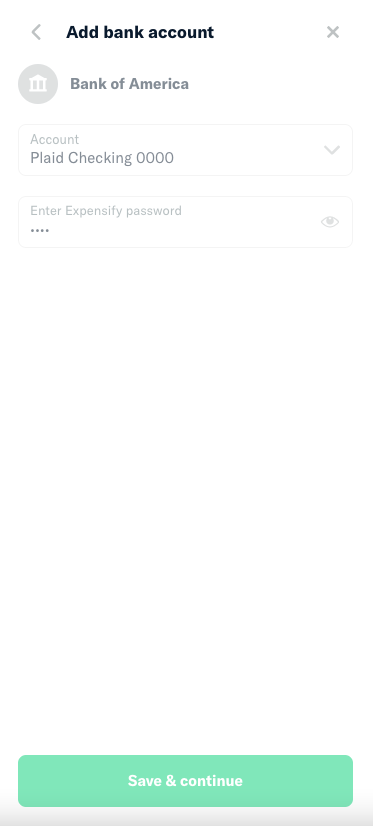
  1. Go to Payments -> Add Payment Method -> Bank Account
    image
  2. Add Plaid login credentials user_good, pass_good, credential_good (if they ask for a code)
  3. Agree to any Plaid Sandbox to pass
  4. Select an account and input an incorrect password
  5. Verify that you see an error below the password field
    image
  6. Click the "x" on the error, verify that it goes away.
  7. Now input the correct password
  8. Verify that the personal bank account was added

Test Offline Behavior

  1. Pick up where you left off last section

  2. Type in an incorrect password

  3. Before submitting, go offline.

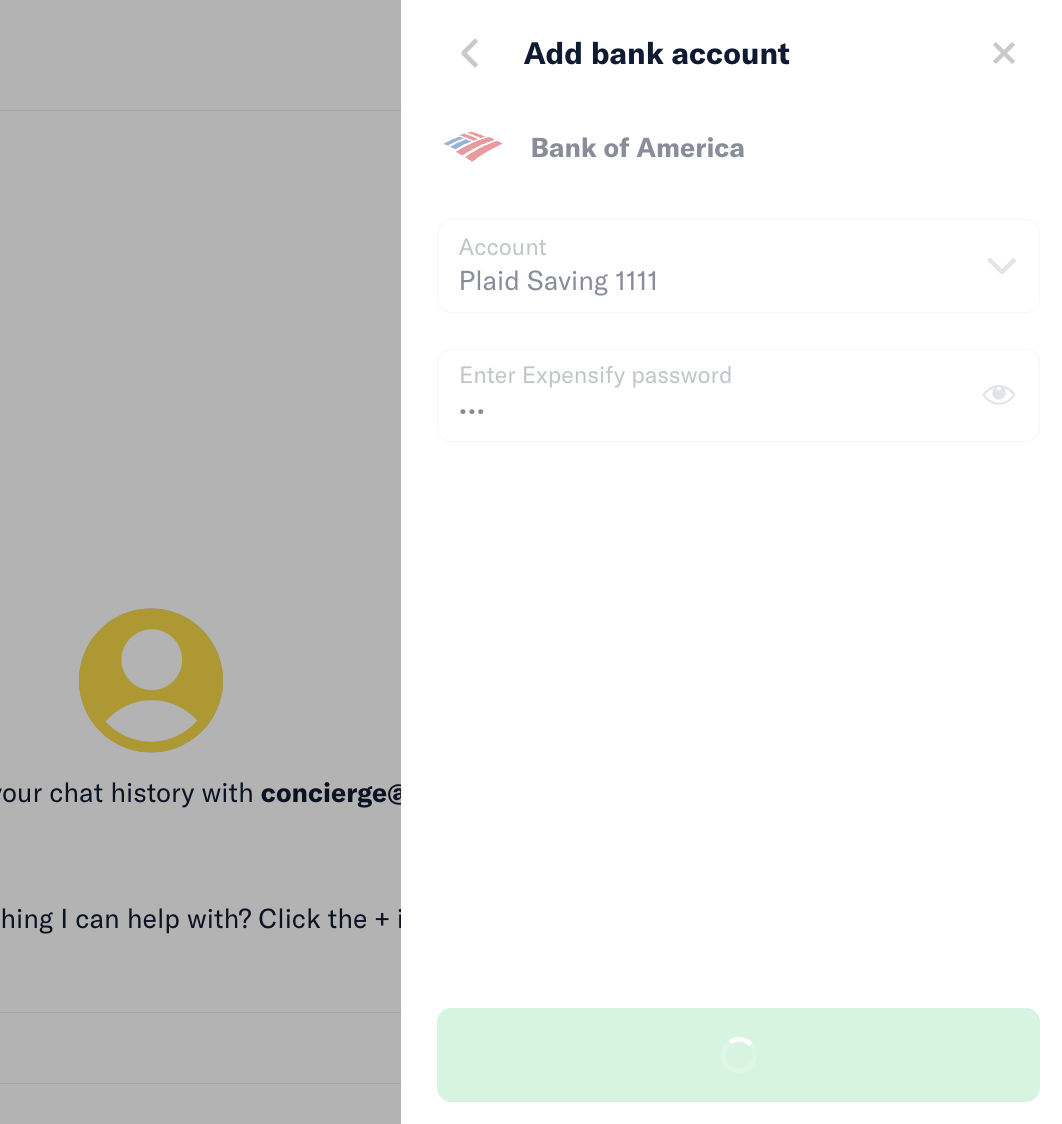
  4. Submit. Verify that everything is greyed out
    image

  5. Go back online and verify that the error still comes up.

  6. Go back offline and submit again.

  7. Now navigate away from the modal (or close it).

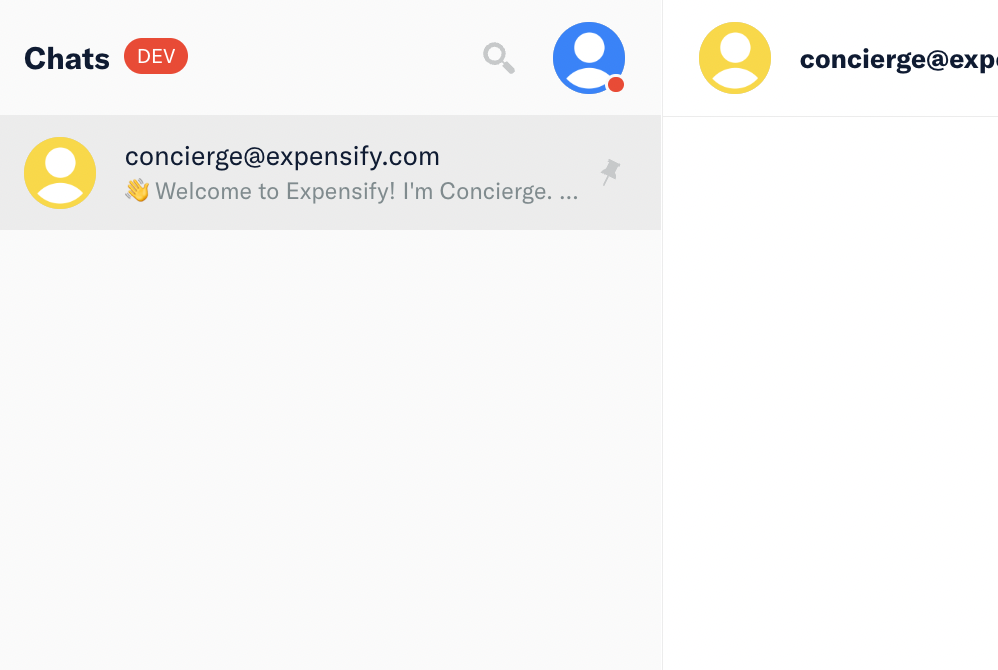
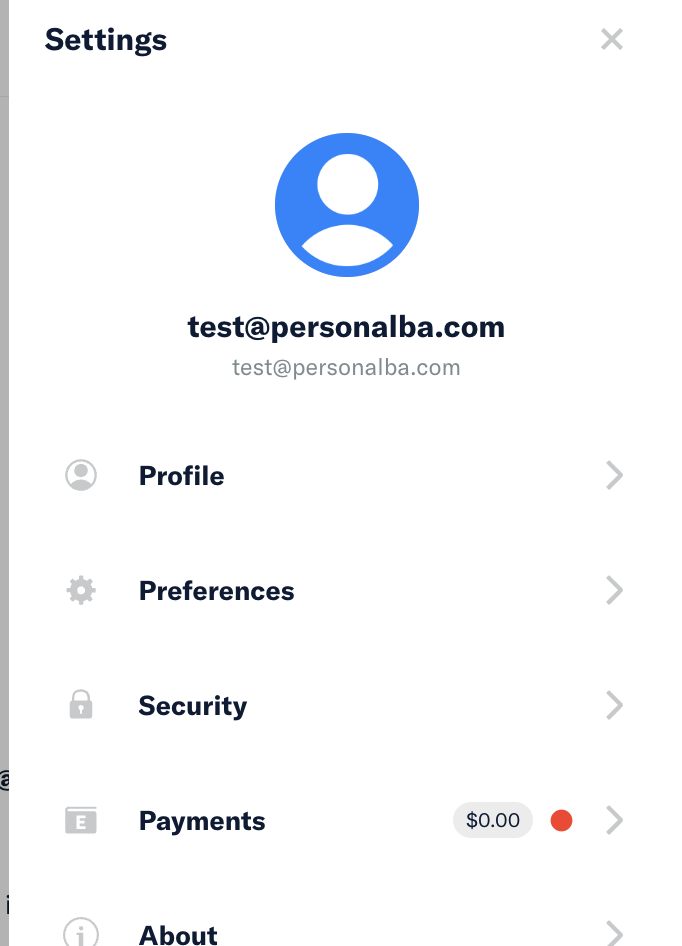
  8. Then go back online, and verify that you see a red brick indicator come up.
    Avatar:
    image

    Payments menu item
    image

    Red brick near the pending bank account
    image

  9. Now click on the pending bank account and then verify that you see the error on the form

  10. Now go back offline.

  11. Type in the correct password

  12. Go offline and then submit.

  13. Navigate away. Then go back online

  14. Go to payments page and verify that the new bank account has been added.

Screenshots

Web

image

Mobile Web

image

image

Desktop

iOS

image

image

Android

@ctkochan22 ctkochan22 requested a review from a team as a code owner September 13, 2022 05:26
@ctkochan22 ctkochan22 self-assigned this Sep 13, 2022
@github-actions

github-actions Bot commented Sep 13, 2022

Copy link
Copy Markdown
Contributor

CLA Assistant Lite bot All contributors have signed the CLA ✍️ ✅

@ctkochan22 ctkochan22 changed the base branch from master to main September 13, 2022 05:26
@melvin-bot melvin-bot Bot requested review from danieldoglas and removed request for a team September 13, 2022 05:26
@ctkochan22

ctkochan22 commented Sep 13, 2022

Copy link
Copy Markdown
Author

To do:

  • Need to fix the opacity issue with the red brick indicator
  • Fix merge conflicts

@MariaHCD MariaHCD self-requested a review September 13, 2022 08:49
@ctkochan22 ctkochan22 requested a review from nkuoch September 14, 2022 20:00
@ctkochan22 ctkochan22 changed the title [WIP] Add Pattern B to creating Personal Bank Account Add Pattern B to creating Personal Bank Account Sep 14, 2022
Comment thread src/components/AddPlaidBankAccount.js Outdated
const selectedPlaidBankAccount = lodashGet(this.props, 'plaidData.selectedPlaidBankAccount', {});
const {icon, iconSize} = getBankIcon();

// Show selected plaid bank account. If not set, check the props to see if we have one pre-selected

Copy link
Copy Markdown
Contributor

Choose a reason for hiding this comment

The reason will be displayed to describe this comment to others. Learn more.

when does that happen? Also, did you mean state instead of props?

Copy link
Copy Markdown
Author

Choose a reason for hiding this comment

The reason will be displayed to describe this comment to others. Learn more.

Well the state of AddPersonalBankAccountPage, but it's being passed into here as a prop.

Copy link
Copy Markdown
Author

Choose a reason for hiding this comment

The reason will be displayed to describe this comment to others. Learn more.

Sorry I'm still trying to wrap my mind around the merge with your PR.

So when you select an account here, we set the state in AddPersonalBankAccount. I wanted to keep the bank account we selected when the user navigate back to the form.

Copy link
Copy Markdown
Contributor

Choose a reason for hiding this comment

The reason will be displayed to describe this comment to others. Learn more.

Then let's just pass selectedPlaidAccountID via props (add add it to the propTypes)

Copy link
Copy Markdown
Author

Choose a reason for hiding this comment

The reason will be displayed to describe this comment to others. Learn more.

Oh I just realized there is a bug (minor edge case) where this all gets messed up if someone is setting up a VBA (using BankAccounts.updatePlaidData) and also setting up a PBA.

  1. Try to create a PBA.
  2. Login into plaid, then selecting the test account that ends with 000. Add an incorrect password and submit (creates a pending PBA)
  3. Now go to your workspace settings. Choose "Connect bank account" to setup VBA. Log into plaid
  4. Selected the bank account 1111.
  5. Navigate bank to the PBA, it will be set to 1111.
  6. Click 0000, go to next tab, the state forced it back to 1111. We just need to run update here too

Copy link
Copy Markdown
Author

Choose a reason for hiding this comment

The reason will be displayed to describe this comment to others. Learn more.

We can just continue to use updatePlaidData here too?

Comment thread src/components/personalBankAccountPropTypes.js
Comment thread src/components/personalBankAccountPropTypes.js Outdated
Comment thread src/languages/en.js
setDefaultFailure: 'Something went wrong. Please chat with Concierge for further assistance.',
},
addBankAccountFailure: 'And unexpected error occurred while trying to add your bank account. Please try again.',
addBankAccountFailure: 'An unexpected error occurred while trying to add your bank account. Please try again.',

Copy link
Copy Markdown
Author

Choose a reason for hiding this comment

The reason will be displayed to describe this comment to others. Learn more.

Typo

@ctkochan22

Copy link
Copy Markdown
Author

Updated

@ctkochan22

Copy link
Copy Markdown
Author

Updated please review again! 🙇

@MariaHCD MariaHCD left a comment

Copy link
Copy Markdown
Contributor

Choose a reason for hiding this comment

The reason will be displayed to describe this comment to others. Learn more.

If a user submits the form when offline, they are shown the below which isn't ideal UX because it is an infinite spinner:
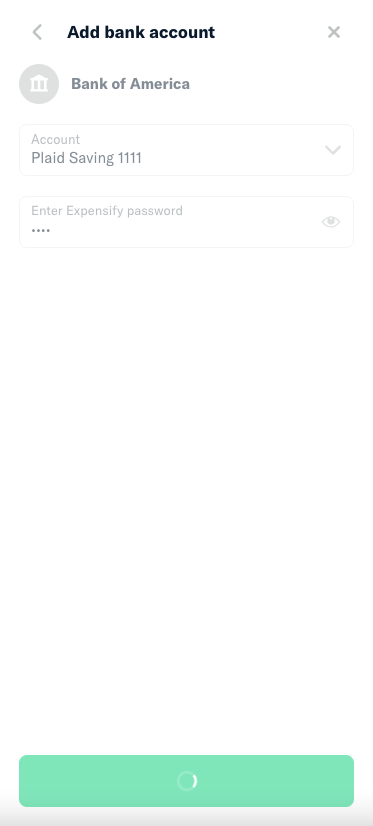
Screen Shot 2022-10-04 at 12 15 38 PM

After submitting, can we navigate to this page instead:
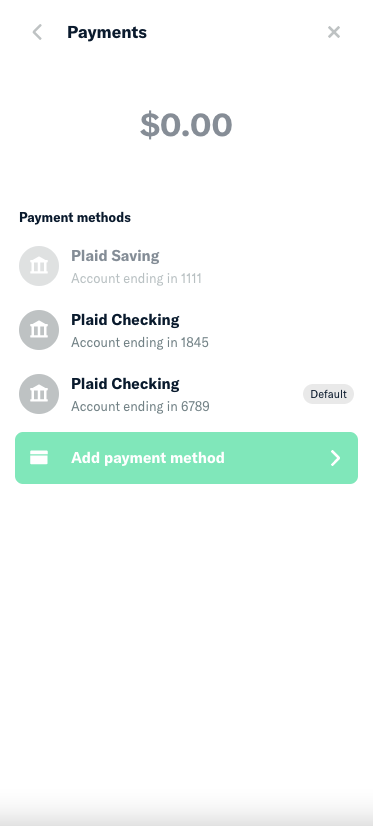
Screen Shot 2022-10-04 at 12 17 02 PM

Comment thread src/components/menuItemPropTypes.js Outdated
Comment thread src/components/personalBankAccountPropTypes.js Outdated
Comment thread src/libs/PaymentUtils.js Outdated
return {};
}

// Get errors

Copy link
Copy Markdown
Contributor

Choose a reason for hiding this comment

The reason will be displayed to describe this comment to others. Learn more.

Why are we reformatting the errors here?

Copy link
Copy Markdown
Author

Choose a reason for hiding this comment

The reason will be displayed to describe this comment to others. Learn more.

This is how we use to. How do we pass back errors now? Atm we don't seem to pass back any errors within the item itself.

We pass errors back in timestamp => errorMessage format, but the item object takes an array of error messages

Copy link
Copy Markdown
Contributor

Choose a reason for hiding this comment

The reason will be displayed to describe this comment to others. Learn more.

Sorry, I don't think I'm following the logic in this function. So we're basically fetching the personalBankAccount currently being setup, taking the errors and adding it to pendingBankAccount (retrieved from the Plaid data). And we're doing this because we need some additional properties like the account number, address name, etc. in formatPaymentMethods. Is that right?

Perhaps an alternative here would be to take the properties we need from pendingBankAccount and add them to personalBankAccount instead. So we won't have to do any reformatting of the errors. Not a major win but maybe would make this more understandable?

Copy link
Copy Markdown
Author

Choose a reason for hiding this comment

The reason will be displayed to describe this comment to others. Learn more.

Ah, so we have bank account info in plaidData. Stuff like unmasked account numbers and such. Data we need to pass to PHP when trying to add a bank account.

Currently, when you try to add a bank account, we let the data sit in plaidData and just save selectePlaidAccountID in the onyxkey personalBankAccount. We currently use that to find the bank account they selected in plaidData. And we then format that data so that it would appear in the payment list.

You are suggesting that upon submission, we save data we need, formatted already, into personalBankAccount. So when we show the payment methods, we don't have to do anything here.

I'm good with that. My argument against that is, we would be doing some sort of "massaging" somewhere in the client side, because its client side data. So instead of doing all the formatting and such here, we'd do it in BankAccounts.addPersonalBankAccount. It may make this method cleaner, but still somewhat convoluted? And I think it'll make it harder to follow.

Copy link
Copy Markdown
Contributor

Choose a reason for hiding this comment

The reason will be displayed to describe this comment to others. Learn more.

Thanks for clarifying! I like your suggestion:

So instead of doing all the formatting and such here, we'd do it in `BankAccounts.addPersonalBankAccount`

I think perhaps the flow would be easier to understand if we did the above. Would something like this work:

  1. The user submits the add bank account form
  2. We fetch the all we need from plaidData and store it in the personalBankAccount key
  3. We can display the pending bank account in the payment methods list without needing any more formatting in formatPaymentMethods(...)

Comment thread src/libs/PaymentUtils.js Outdated
Comment on lines +39 to +40
// See if we need to show a pending bank account in the payment methods list
if (!_.isEmpty(pendingBankAccount)) {

Copy link
Copy Markdown
Contributor

Choose a reason for hiding this comment

The reason will be displayed to describe this comment to others. Learn more.

Is this data massaging something we can do in OpenPaymentsPage instead?

Copy link
Copy Markdown
Author

Choose a reason for hiding this comment

The reason will be displayed to describe this comment to others. Learn more.

I don't think so. This pending bank account is all local data. None of this is stored on the server-side. Just like plaid data

Copy link
Copy Markdown
Author

Choose a reason for hiding this comment

The reason will be displayed to describe this comment to others. Learn more.

Is this data massaging? Something can be empty or undefined.

Copy link
Copy Markdown
Contributor

Choose a reason for hiding this comment

The reason will be displayed to describe this comment to others. Learn more.

Is this data massaging?

Ah, sorry, I wasn't clear. I meant the data massaging on lines 43 - 54.

But if this data is all local data then I don't see how we can avoid this 🤔

Comment thread src/pages/settings/Payments/PaymentMethodList.js Outdated
Comment thread src/pages/settings/Payments/PaymentsPage/BasePaymentsPage.js Outdated
@danieldoglas danieldoglas removed their request for review October 4, 2022 14:15
@ctkochan22

Copy link
Copy Markdown
Author

After submitting, can we navigate to this page instead:

You mean when they submit offline. We could, although I feel like we common practice is to keep them there? We give them the option to navigate away, but what if they only lost connection for a second? It would be annoying to be navigated away when you are a second away from getting feedback

Comment thread src/libs/PaymentUtils.js Outdated
Comment on lines +39 to +40
// See if we need to show a pending bank account in the payment methods list
if (!_.isEmpty(pendingBankAccount)) {

Copy link
Copy Markdown
Contributor

Choose a reason for hiding this comment

The reason will be displayed to describe this comment to others. Learn more.

Is this data massaging?

Ah, sorry, I wasn't clear. I meant the data massaging on lines 43 - 54.

But if this data is all local data then I don't see how we can avoid this 🤔

Comment thread src/pages/settings/Payments/PaymentsPage/BasePaymentsPage.js Outdated
Comment thread src/pages/settings/Payments/PaymentMethodList.js Outdated
Comment thread src/libs/PaymentUtils.js Outdated
return {};
}

// Get errors

Copy link
Copy Markdown
Contributor

Choose a reason for hiding this comment

The reason will be displayed to describe this comment to others. Learn more.

Sorry, I don't think I'm following the logic in this function. So we're basically fetching the personalBankAccount currently being setup, taking the errors and adding it to pendingBankAccount (retrieved from the Plaid data). And we're doing this because we need some additional properties like the account number, address name, etc. in formatPaymentMethods. Is that right?

Perhaps an alternative here would be to take the properties we need from pendingBankAccount and add them to personalBankAccount instead. So we won't have to do any reformatting of the errors. Not a major win but maybe would make this more understandable?

@MariaHCD

MariaHCD commented Oct 5, 2022

Copy link
Copy Markdown
Contributor

although I feel like we common practice is to keep them there? We give them the option to navigate away, but what if they only lost connection for a second? It would be annoying to be navigated away when you are a second away from getting feedback

That's an interesting point. Maybe just my perspective but if I was offline and saw the whole form go blank, it wouldn't be clear what was happening.

Screen Shot 2022-10-05 at 12 42 44 PM

If I was redirected to the payment methods page showing the bank account greyed out, it would be clear that it's pending creation.

@MariaHCD

MariaHCD commented Oct 5, 2022

Copy link
Copy Markdown
Contributor

Also, not sure if related to this PR but the loading indicator isn't centered anymore

Screen Shot 2022-10-05 at 12 53 32 PM

@ctkochan22

Copy link
Copy Markdown
Author

Okay, we are close. I can feel it!

Issue: We want to avoid all the massaging here.

  • We currently have all the unformatted data saved in the onyxkey plaidData
  • When the user hits the submit button(addPersonalBankAccount()), we will add the key pendingBankAccount to the onyxkey personalBankAccount. Which will store all the formatted data we need to display it on the payment method list.
    • accountData, accountType, description, etc
  • When they click on the pending bank account from the payment method list, they will go back to the add personal bank account form. We skip plaid and the form will be filled according to plaidData.selectedPlaidAccount

This is the solution @MariaHCD and I agreed on. Can you take a look and let us know your thoughts so we are on the same page?

@MariaHCD

MariaHCD commented Oct 6, 2022

Copy link
Copy Markdown
Contributor

That approach makes sense to me.

we will add the key pendingBankAccount to the onyxkey personalBankAccount

Perhaps we can have ^ set in the optimisticData here.

@ctkochan22

Copy link
Copy Markdown
Author

@ctkochan22 ctkochan22 closed this Oct 7, 2022
@coleaeason coleaeason deleted the ckt_refactor_PBA_patternb branch May 19, 2026 19:33
Sign up for free to join this conversation on GitHub. Already have an account? Sign in to comment

Labels

None yet

Projects

None yet

Development

Successfully merging this pull request may close these issues.

3 participants