If you haven’t already, check out our contributing guidelines for onboarding and email contributors@expensify.com to request to join our Slack channel!
Issue was found when executing #6542
Action Performed:
- Launch the app and login
- Go to settings and select a workspace
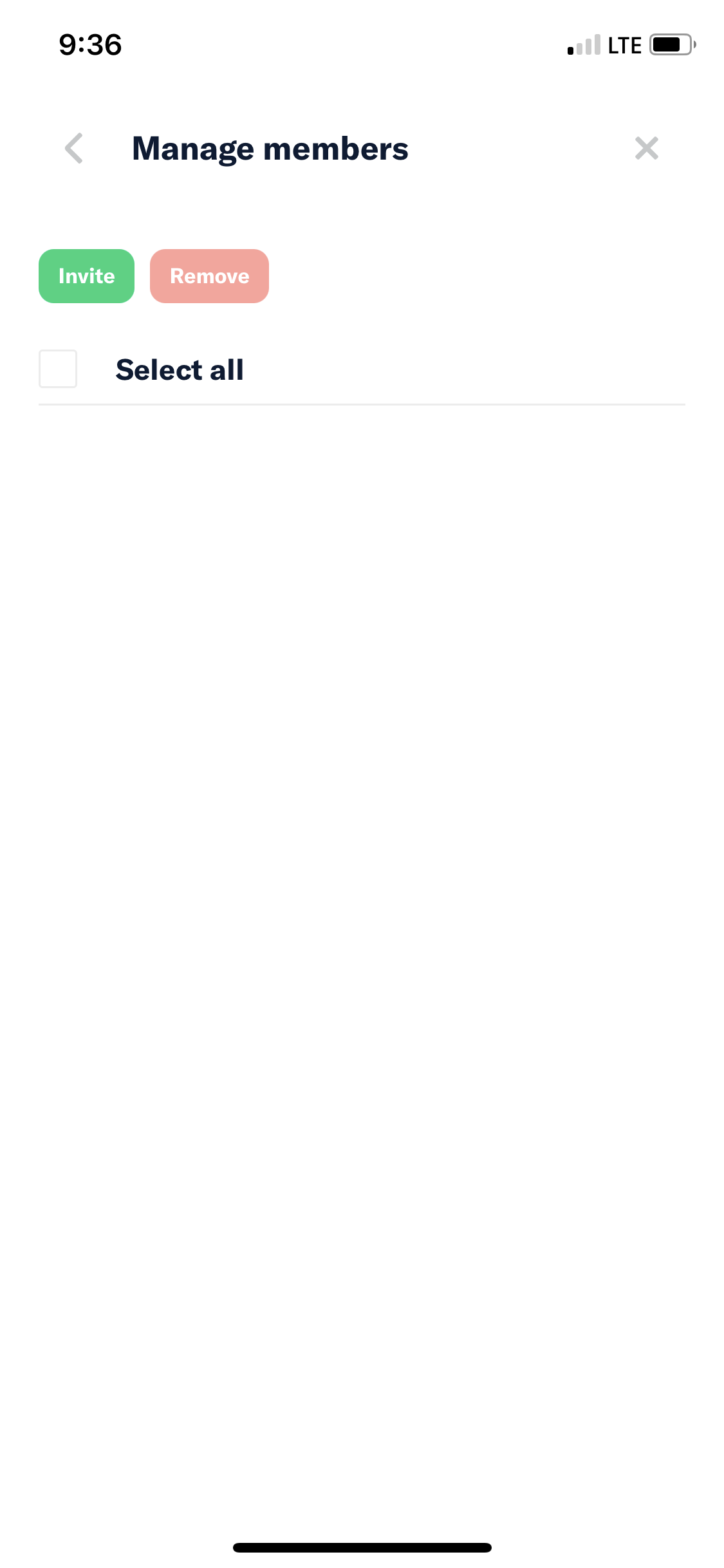
- Tap Manage members
Expected Result:
In the manage members screen I should see all the members
Actual Result:
None of the members are displayed
Workaround:
Unknown
Platform:
Where is this issue occurring?
Version Number: 1.1.18.0
Reproducible in staging?: Yes
Reproducible in production?: No
Logs: https://stackoverflow.com/c/expensify/questions/4856
Notes/Photos/Videos:
Issue was found when executing the PR #6542
Expensify/Expensify Issue URL:
Issue reported by: Applause
Slack conversation:
View all open jobs on GitHub

If you haven’t already, check out our contributing guidelines for onboarding and email contributors@expensify.com to request to join our Slack channel!
Issue was found when executing #6542
Action Performed:
Expected Result:
In the manage members screen I should see all the members
Actual Result:
None of the members are displayed
Workaround:
Unknown
Platform:
Where is this issue occurring?
Version Number: 1.1.18.0
Reproducible in staging?: Yes
Reproducible in production?: No
Logs: https://stackoverflow.com/c/expensify/questions/4856
Notes/Photos/Videos:
Issue was found when executing the PR #6542
Expensify/Expensify Issue URL:
Issue reported by: Applause
Slack conversation:
View all open jobs on GitHub