If you haven’t already, check out our contributing guidelines for onboarding and email contributors@expensify.com to request to join our Slack channel!
Action Performed:
Not sure how to reproduce this issue, I have experienced it a few times but without solid reproducible steps.
- Use the app and check the LHN for user avatars.
Expected Result:
User avatars should be always displayed in LHN.
Actual Result:
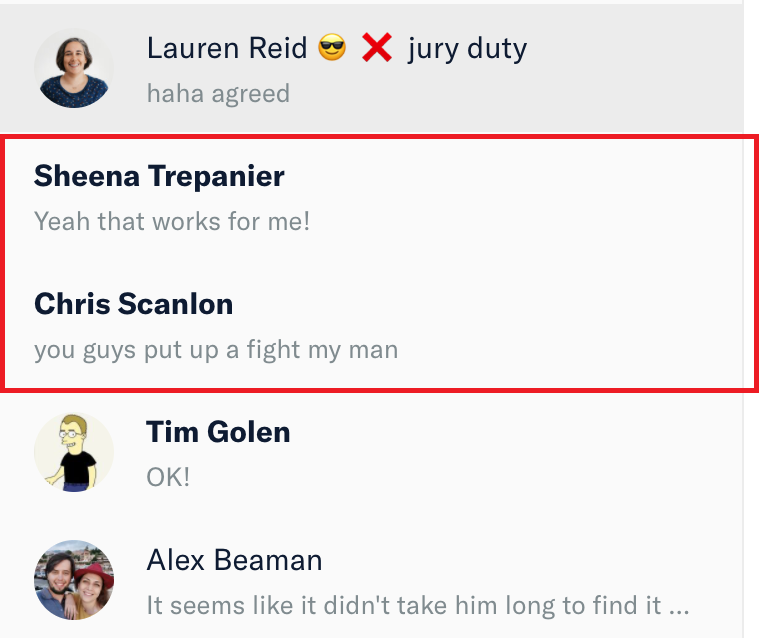
2 user avatars disappeared from LHN. Grey default icon for avatars is also not visible.
Workaround:
Unknown.
Platform:
Where is this issue confirmed?
Version Number: 1.0.97-0
Logs: https://stackoverflow.com/c/expensify/questions/4856
Notes/Photos/Videos: Any additional supporting documentation
Expensify/Expensify Issue URL:
Issue reported by: @puneetlath
Slack conversation: https://expensify.slack.com/archives/C01GTK53T8Q/p1631293839171100
View all open jobs on GitHub

If you haven’t already, check out our contributing guidelines for onboarding and email contributors@expensify.com to request to join our Slack channel!
Action Performed:
Not sure how to reproduce this issue, I have experienced it a few times but without solid reproducible steps.
Expected Result:
User avatars should be always displayed in LHN.
Actual Result:
2 user avatars disappeared from LHN. Grey default icon for avatars is also not visible.
Workaround:
Unknown.
Platform:
Where is this issue confirmed?
Version Number: 1.0.97-0
Logs: https://stackoverflow.com/c/expensify/questions/4856
Notes/Photos/Videos: Any additional supporting documentation
Expensify/Expensify Issue URL:
Issue reported by: @puneetlath
Slack conversation: https://expensify.slack.com/archives/C01GTK53T8Q/p1631293839171100
View all open jobs on GitHub