Hey guys, i have installed the nextcloud client version 2.5.1 on two Windows Machines and cant see any overlay icons in the windows explorer.
I even tried it with a fresh installed Windows 10 Pro x64 Version in a virtual Machine! No icons.

Tried a couple of things from this thread: https://help.nextcloud.com/t/missing-sync-icons-in-windows-explorer/6610
But its not working.
The command:
regsvr32.exe “C:\Program Files (x86)\Nextcloud\shellext\OCOverlays_x64.dll”
throws an "file not found" error, but the file is available in this directory.
The registry folder: (HKLM\SOFTWARE\Microsoft\Windows\CurrentVersion\Explorer\ShellIconOverlayIdentifiers) also does not contain any OC Keys:
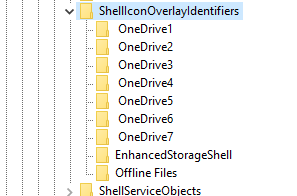
The command
reg delete "HKEY_CLASSES_ROOT\CLSID\{0960F090-F328-48A3-B746-276B1E3C3722}" /f
also throws an key not found error.
Uninstalling Microsoft One Drive and deleting the keys in the above picture didnt bring any help.
Regarding Dependency Walker, there are a lot of dependencys missing?:
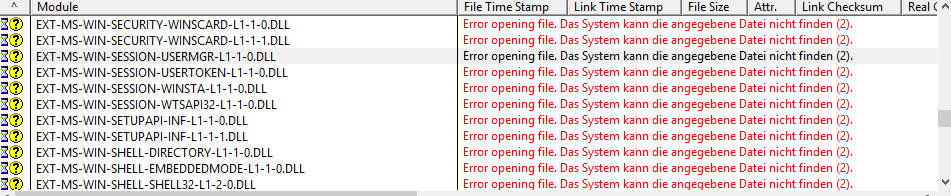
Any ideas ?


Hey guys, i have installed the nextcloud client version 2.5.1 on two Windows Machines and cant see any overlay icons in the windows explorer.

I even tried it with a fresh installed Windows 10 Pro x64 Version in a virtual Machine! No icons.
Tried a couple of things from this thread: https://help.nextcloud.com/t/missing-sync-icons-in-windows-explorer/6610
But its not working.
The command:
regsvr32.exe “C:\Program Files (x86)\Nextcloud\shellext\OCOverlays_x64.dll”throws an "file not found" error, but the file is available in this directory.
The registry folder: (HKLM\SOFTWARE\Microsoft\Windows\CurrentVersion\Explorer\ShellIconOverlayIdentifiers) also does not contain any OC Keys:

The command
reg delete "HKEY_CLASSES_ROOT\CLSID\{0960F090-F328-48A3-B746-276B1E3C3722}" /falso throws an key not found error.
Uninstalling Microsoft One Drive and deleting the keys in the above picture didnt bring any help.
Regarding Dependency Walker, there are a lot of dependencys missing?:

Any ideas ?